
Microsoft 365 has become the backbone of modern workplaces, powering communication, collaboration, file sharing, and productivity through applications such as Outlook, Teams, SharePoint, OneDrive, and the Microsoft Office suite. As organizations grow, however, managing a Microsoft 365 tenant becomes increasingly complex. User onboarding, license management, security policies, compliance, and ongoing administration require continuous attention and technical expertise.
Managing that space properly is what people mean when they talk about Microsoft 365 tenant services. Done well, it keeps your business productive, secure, and compliant. Done poorly, it creates the kind of quiet chaos that shows up months later as a data breach, a licensing overspend, or an audit finding nobody can explain.
This guide breaks down what tenant services actually cover, why they matter, and what to look for if you're evaluating a provider.
What Is a Microsoft 365 Tenant?
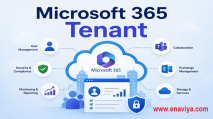
When your company signs up for Microsoft 365, Microsoft creates a dedicated instance of its cloud services just for you. This is your tenant. It's tied to your domain (like enaviya.com) and includes:
- Azure Active Directory (now Microsoft Entra ID) for identity and access management
- Exchange Online for email and calendars
- SharePoint Online and OneDrive for file storage
- Teams for communication and collaboration
- Security and compliance tools like Microsoft Defender and Purview
Every user, device, license, and policy inside your organization lives inside this tenant. It's the foundation everything else is built on, which is why getting the configuration right matters so much.
What Do Microsoft 365 Tenant Services Actually Include?
Tenant services cover the full lifecycle of managing that environment. Here's what falls under this umbrella.
1. Tenant Setup and Configuration
Initial setup goes well beyond clicking through a signup wizard. A proper configuration includes domain verification, DNS records, security baselines, conditional access policies, and naming conventions that will still make sense two years from now. Skipping this step is one of the most common reasons companies end up with a messy, hard-to-manage environment later.
2. Identity and Access Management
This is arguably the most important piece. Managing who can access what, and under which conditions, is central to keeping a tenant secure. This includes:
- Multi-factor authentication enforcement
- Conditional access policies based on location, device, or risk level
- Single sign-on integration with other business apps
- Role-based access control so employees only see what they need
Weak identity management is behind a large share of cloud security incidents, so this isn't an area to treat as an afterthought.
3. License and Subscription Management
Microsoft 365 offers dozens of license types, from Business Basic to E5, plus add-ons for security, voice, and compliance. Without active oversight, companies routinely pay for licenses nobody uses, or worse, run critical staff on plans missing features they actually need. Good tenant management includes regular license audits, right-sizing subscriptions, and matching licenses to actual job requirements.
4. Security and Compliance
Microsoft 365 comes with a strong set of built-in security tools, but they don't configure themselves. This part of tenant services covers:
- Threat protection through Microsoft Defender
- Data loss prevention policies
- Information governance and retention rules
- Compliance with standards like HIPAA, GDPR, or ISO 27001, depending on your industry
- Regular security assessments using Microsoft Secure Score
A tenant with default settings left untouched is a much easier target than one that's been properly hardened.
5. Data Backup and Recovery
Here's something many businesses don't realize: Microsoft does not fully back up your data the way you might assume. Its shared responsibility model means Microsoft keeps the infrastructure running, but protecting against accidental deletion, ransomware, or user error is largely on you. Third-party backup solutions and clear recovery procedures are a standard part of proper tenant management.
6. Migration Services
Moving to Microsoft 365 from on-premises systems, or consolidating multiple tenants after a merger or acquisition, is a specialized job. It involves mailbox migrations, file transfers, permission mapping, and careful planning to avoid downtime. A rushed migration is one of the fastest ways to lose data or lock users out of their own mailboxes.
7. Ongoing Monitoring and Support
A tenant isn't something you set up once and forget. Microsoft rolls out updates constantly, threats evolve, and staff numbers change. Ongoing services include monitoring for unusual sign-in activity, patching configuration gaps, managing helpdesk requests, and keeping the environment aligned with how the business is actually operating.
Why Tenant Management Matters More Than Most Businesses Realize?
A lot of companies treat Microsoft 365 as something that just works out of the box. To a point, that's true. But the default settings are built for broad compatibility, not for your specific security needs or workflows.
Here's what tends to happen when tenant management is neglected:
- Security gaps widen. Old accounts stay active after employees leave. MFA isn't enforced consistently. Sensitive files end up shared more broadly than intended.
- Costs creep up. Unused licenses pile up, and nobody notices until the annual renewal bill arrives.
- Compliance risk grows. Retention policies aren't set correctly, and if an audit or legal request comes in, the data either isn't there or is impossible to find quickly.
- Productivity suffers. Poorly configured Teams, SharePoint, or permission structures create friction that employees just learn to work around, usually in ways that create new risks.
None of this happens overnight. It builds slowly, which is exactly why it's easy to overlook until something forces the issue.
In-House vs. Managed Tenant Services
Some businesses handle tenant management internally through an IT department. Others bring in a managed service provider (MSP) that specializes in Microsoft 365 administration. Each approach has trade-offs.
In-house management gives you direct control and staff who know your business intimately. It works well for larger organizations with dedicated Microsoft 365 expertise on staff. The downside is that Microsoft's ecosystem changes constantly, and staying current requires real, ongoing investment in training.
Managed services bring specialized expertise and often 24/7 monitoring without you having to build that capability internally. This tends to suit small and mid-sized businesses that need enterprise-level security and management but don't have the headcount to support a dedicated Microsoft 365 administrator. The trade-off is less direct day-to-day control, so choosing a provider you trust matters.
Many businesses land on a hybrid approach: internal staff handle daily requests, while a specialized provider manages security configuration, backups, and complex projects like migrations.
Choosing a Microsoft 365 Tenant Services Provider
If you're bringing in outside help, a few things are worth checking before you sign a contract:
- Microsoft partner status. Look for a Microsoft Solutions Partner designation, which signals verified expertise and direct access to Microsoft's support channels.
- Security-first approach. Ask how they handle MFA enforcement, conditional access, and incident response, not just whether they offer these services.
- Clear reporting. You should get regular, understandable reports on license usage, security posture, and any incidents, not just a monthly invoice.
- Backup strategy. Confirm they use a dedicated third-party backup solution rather than relying solely on Microsoft's native retention features.
- Response times. Ask about actual SLAs for support tickets and security incidents, and get them in writing.
A good provider should be able to explain their approach in plain language, not just list product names.
Getting the Most Out of Your Microsoft 365 Investment
Microsoft 365 is a genuinely powerful platform, but its value depends heavily on how it's configured and maintained. Companies that invest in proper tenant management tend to see fewer security incidents, cleaner license spending, and less day-to-day friction for employees.
If your current setup is mostly default settings from whenever you first signed up, it's worth a review. A tenant health check, whether done internally or by an outside provider, usually surfaces gaps that are quick to fix once you know they're there.
The goal isn't to chase every available feature. It's to build an environment that matches how your business actually works, protects the data that matters, and doesn't require constant firefighting to keep running.