Mobile Creches- Intranet Portal (Knowledge Management System) - Case Study
Client Overview
Our client is a non-profit organization (NGO) in India that focuses on enhancing the health, education, and overall development of children living at construction sites. The organization caters to the needs of both children and families belonging to migrant and disadvantaged communities. With extensive experience in early childhood care, the organization strives to offer childcare, education, health care, and other essential services to children.
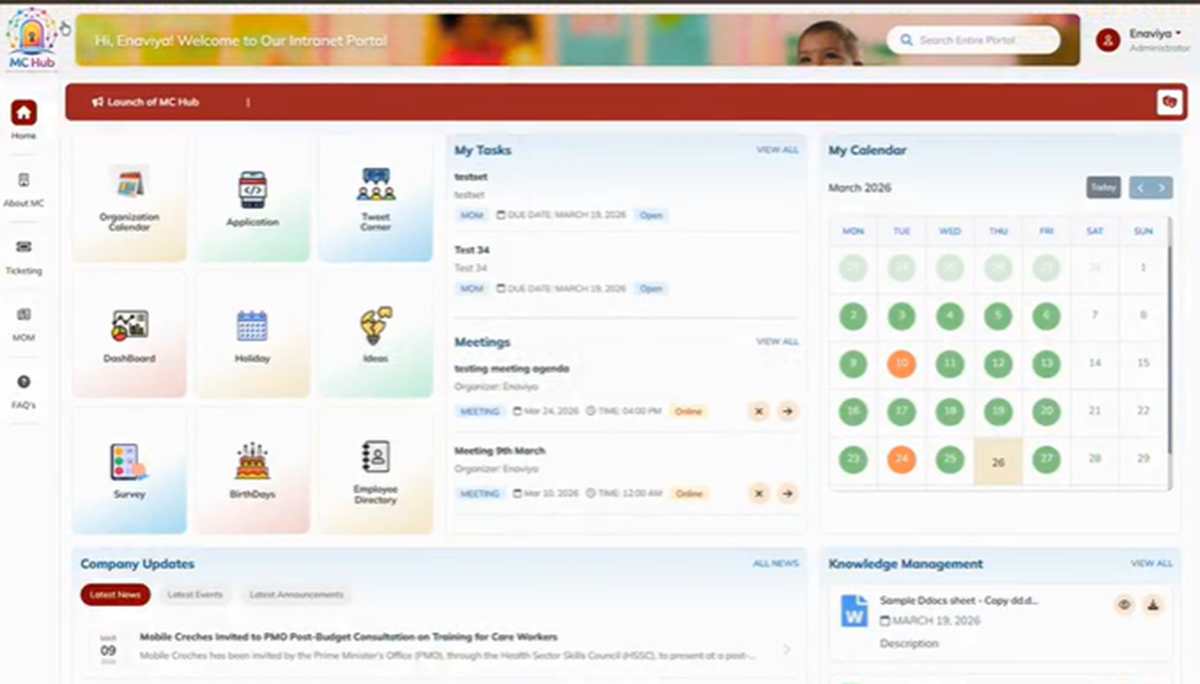
The organization was in need of an efficient method for managing and transferring knowledge, documents, policies, training materials, and internal information among departments and locations. Therefore, they partnered up with Enaviya to build an Intranet Portal (Knowledge Management System) with the help of SharePoint. The new solution offered an organization a centralized place for knowledge management, document management, policy management, news announcements, employee resources, discussions, forums, feedback, events, search, role based access and notifications and dashboards.
Client Requirements
Our client was in need of an efficient way to handle knowledge management and internal information. Their goal was to create a centralized Intranet portal for employees, regardless of department or location. The users should have access to documents, policies, news, training materials, etc. They also wanted content owners to have control over content, updates, and permissions. The system needed knowledge and document management features, search, role-based access, collaboration, workflows, notifications, feedback, and dashboards.
- Create an Intranet Portal using SharePoint Online
- Create a centralized location to access the organizational information and resources
- Allow the users to upload, categorize and search for content
- Manage documents, policies, and SOPs
- Maintain document version history and approval workflows
- Allow users to access information based on their roles in the organization
- Allow to share the necessary information, news, important announcements/events
- Create a space for FAQs, learning resources, and a knowledge base
- Enable Discussion Forms and facilitate employee collaboration
- Enable employees to share suggestions, feedback, and best practices
- Issue tasks, alerts, reminders, and notifications
- Provide dashboards and data analysis based on user roles
- Support employee directory and application access
- Integrate with existing Microsoft 365 applications wherever necessary
Project Summary
The client needed a systematic way to manage its organizational knowledge and internal information. The various forms of information were managed across different departments and locations. The organization needed a centralized platform and a solution to access information such as documents, training resources, articles, announcements, and all important information in an organized way.
To fulfil the specific requirements, Enaviya developed an Intranet Portal (Knowledge Management System) through SharePoint. The Intranet serves as a central hub for important employee related data and resources. Through the portal, employees can access necessary documents, policies, training materials, FAQs, news, important announcements, discussion forms, event details, and other resources.
The intranet portal will allow users to access it based on their roles. Admins will manage sections and user access. Owners of content will be responsible to create and modify content in their designated sections. Users will have the ability to search and access information depending on their permissions. The portal will also support a version history for documents, workflow approvals, notifications, feedback, assignments, and dashboards.
Looking for a Smarter Intranet & Knowledge Management System?
Centralize company knowledge, documents, resources, and communication in one secure and accessible intranet portal.
Our Global Offices
India
#563-564 Niran Arcade, 3rd Floor, New BEL Road, Bengaluru, Karnataka 560094
+91-98452 05968 info@enaviya.comUSA
8682 SPRING GARDEN DR,
# 8205 KELLER,
TX 76244
South Africa
Suite J, 4th Floor,
165 West street, Sandton,
Johannesburg,
South Africa - 2031
Follow Our Social network
Challenges
Before the implementation of the Intranet Portal, the organization faced several challenges regarding the management and sharing of information. The information needed to be accessed across different departments and places. It was not easy for the employees to have access to information like documents, policies, training resources and internal updates. Thus, it was important for the clients to have a structured way to maintain organizational information.
Scattered Organizational Information
The organization’s information was spread across different departments and locations. Employees needed a better solution to access important organizational data and facts in one place.Challenges in finding Information
Employees faced issues when trying to find necessary documents, policies and other resources. It was necessary to find a better way to look up important information.Limited Information Sharing
The organization faced difficulties in circulating organization’s information, training materials, and best practices. Employees want better access to such information within the organization.Inconsistent Document Management
Managing important documents, SOPs and policies was a challenging task for employees and content owners. It became quite hard to track the current version of the document, ownership, approvals, modifications, and so on.Problems in sharing Information
It is hard for employees to get access to recent news, events, and organizational updates in one place. It is not easy for them to obtain information because it is available through different platforms.Limited Employee Collaboration
Employees did not have any common platform to discuss, share ideas, give feedback, and share knowledge. This made it difficulty in promoting collaboration among teams in different locations.Solution Implemented
To solve the problems, Enaviya developed an Intranet Portal using SharePoint. This solution combines important organizational information, documents, and communication in one platform. At the same time, it guarantees that employees have easier access to the information they need. It also makes possible an effective knowledge exchange among employees across departments and locations.
Centralized Knowledge Repository
The solution offers a centralized location for employees to access organizational knowledge, training resources, best practices, case studies, FAQs, etc. The system provides access to relevant information through the Intranet portal.
Document and Policy Management
The system has an organized way of managing SOPs, policies, and other documents. The features include version history, document ownership, approval, change tracking, permission, and revision management.
Employee Communication
The organization has created several sections on the Intranet Portal such as news, announcements, events, important updates, new joiners, birthdays, rewards and recognition. The portal provides an easy way for the employees to access all the information regarding their organization.
Collaboration and Knowledge Sharing
Employees can take part in various discussion forums and share ideas, feedback, and knowledge with others. The portal also provides FAQs, survey polls, and other collaboration features to encourage employee participation.
Search and Role-Based Access
This solution includes search features for documents, policies, people, and other information on the Intranet portal. Users can access to the information is based on the role and permissions.
Tasks and Notifications
The system allows users to manage tasks, approvals, alerts, reminders, and notifications. Thus, users are able to monitor their assigned tasks and stay informed about the latest updates and relevant events.
How the Solution Works
Through the portal, the organizational information and resources can be easily accessed by the employees. There is an option available for logging into the system and accessing required information based on the assigned role and permission. Once permitted, the employee can search for the required documents, knowledge resources, latest announcements, events, and various other employee services available.
Access to Users
Users can login to the intranet portal. Access is provided by the system according to the user's respective role and permissions.
Browse and Search
Users can browse through the different sections available or they can search for documents, policies and other data resources.
View and Access
Users will be able to view various resources including documents, policies, training aids, FAQs, news, announcements, and more.
Develop and Control
Authorized users are able to upload and update content. They are able to manage documents via specified permissions, version history and approvals.
Interact and Communicate
Employees can participate in discussions, share ideas, provide feedbacks and stay informed about relevant events.
Core Modules Implemented
Enaviya has built modules on the Intranet Portal that will help both employees and admin officials. Different modules focus on different aspects of knowledge management, collaboration, communication, and employee services. These modules include essential elements like knowledge management, document management, communication, collaboration, user access, search, and administration. All these modules combine together to provide a systematic way to handle organizational information via one system.
Knowledge Management
The module is designed to give access to training materials, success stories, FAQs and various types of organization’s information.
Document and Policy Management
This module manages SOPs, policies, and documents. It helps to track ownership, approvals, versions of documents, and any changes made in documents.
Communication and Events
This module deals with managing news, latest announcements, updates, events, new employees welcoming, birthday wishes and reward opportunities etc.
Collaboration and Ideas
This component supports discussion forums as well as encouraging employees to share ideas/opinions, give feedback, answer questions etc.
User Access and Roles
This module is responsible for user access based on their roles and permissions. It is responsible for providing access to various Intranet segments, documents, applications, and resources.
Search Option
This module supports the Intranet search functionality. Users can utilize the search option to locate documents, guidelines and other important information.
Tasks and Notifications
This module is responsible for managing tasks, approvals, reminders, alerts, and notifications. Users have the ability to create their own tasks and receive updates regarding their activities.
Final Result
After the successful implementation of the Intranet Portal, our client has an efficient way of accessing and sharing important information. Employees can get access to required information easily. The system improves the sharing of knowledge and promotes teamwork. It allows better sharing of information among various teams and departments.
Easy access to information
Workers can find very important information in one centralized location. As a result, it makes easier to find the relevant information when needed.
Better knowledge Sharing
Employees can share knowledge across teams and locations. This helps the organization to retain and reuse valuable knowledge.
Improved Team Collaboration
Employees have an innovative way of collaborating with each other and sharing their thoughts. As a result, they can remain connected and carry out tasks more effectively.
Better Information Management
The company gains better control of its most essential information. Thus, the organization is capable of keeping important content organized.
Improved Internal Communication
Employees can stay informed about latest updates and activities. This helps to advance the flow of information across organization.
Better Employee Engagement
Employees now have more opportunities to get involved and contribute. This enables the workplace to become more engaged.
Tools & Technologies Used

Azure Active Directory
Microsoft 365

Power BI
SharePoint Framework (SPFx)
SharePoint Insights

Single Sign-On (SSO)
Industry
- NGO / Non Profit
Copyright © 2026 Enaviya Information Technologies Pvt. Ltd. All rights reserved
