
SharePoint Online Document Management System with Automated Provisioning - Case Study
Client Overview
Our client is a leading manufacturer of acrylic emulsions in India. The company supplies adhesive and emulsion products across India and also exports to international markets.
The organization required a structured way to manage its business documents. It required a clear document structure for locations, departments, users, and desktops. As a result, the organization partnered with Enaviya to develop a Document Management System (DMS) within SharePoint Online.
Client Requirements
The client required an efficient method of managing business documents. They needed a clear documentation storage structure. The users were required to have easy access to their assigned folders. The organization also needed strict controls over document access, retrieval, collaboration, and the recovery of files.
- Develop a well-organized document management system (DMS) on SharePoint Online.
- Classify documents in accordance with their type, location, and department.
- Create separate folders for each user and their desktop files.
- Assign permission levels according to user roles.
- Allow users to access their folders via SharePoint, Teams, and OneDrive.
- Allow users to download, upload, and manage documents.
- Support document collaboration and editing files online.
- Provide a search feature for various files, folders, or any document content
- Enable file recovery and version history
- Automate the creation of libraries or folders through PowerShell.
- Use Excel files to set up folders and permissions in terms of details.
- Support user onboarding and access updates via provisioning process.
Project Summary
The client was looking for a better approach for managing the organization's documents. The organization had documents in diverse locations and departments. Thus, it needed greater control over document access. The users of find and handle their files.
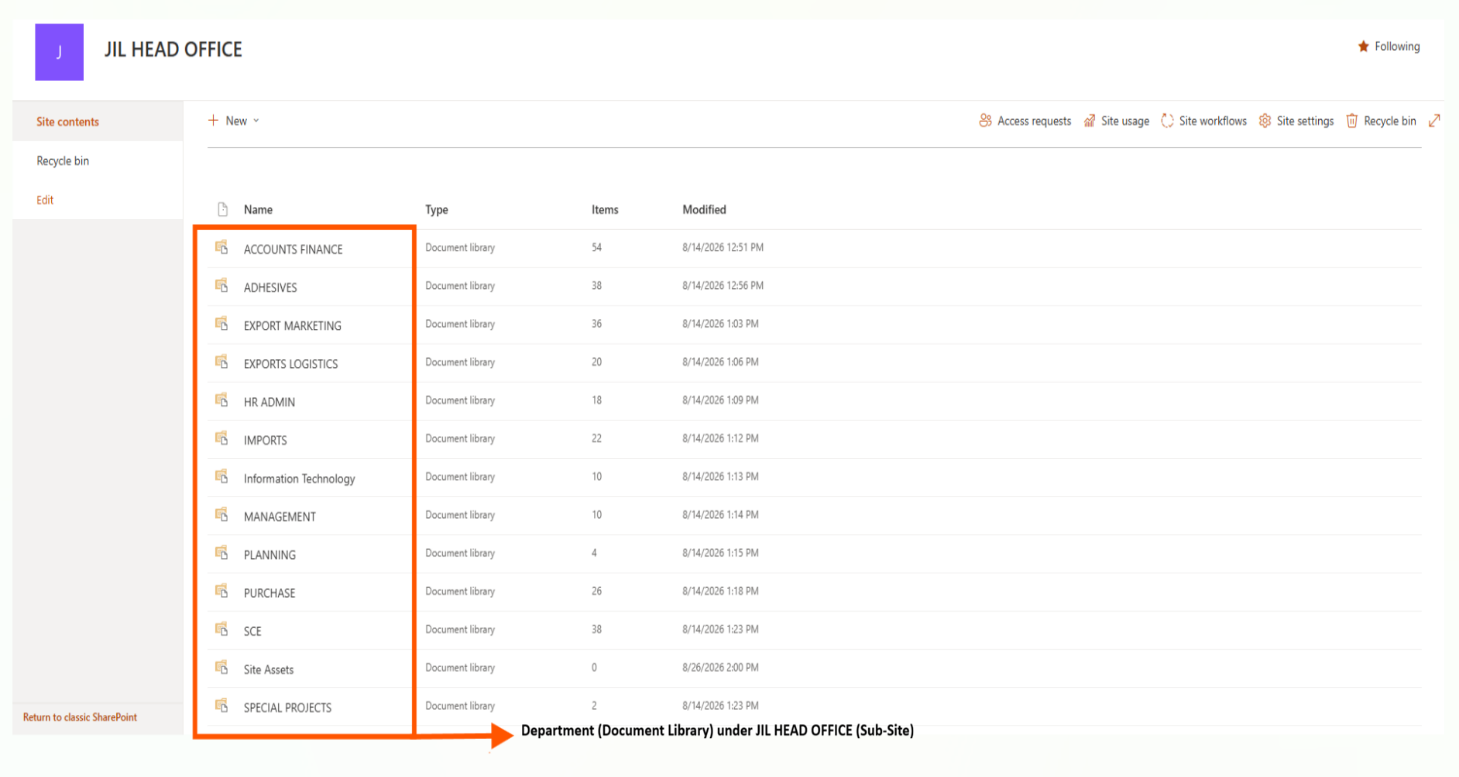
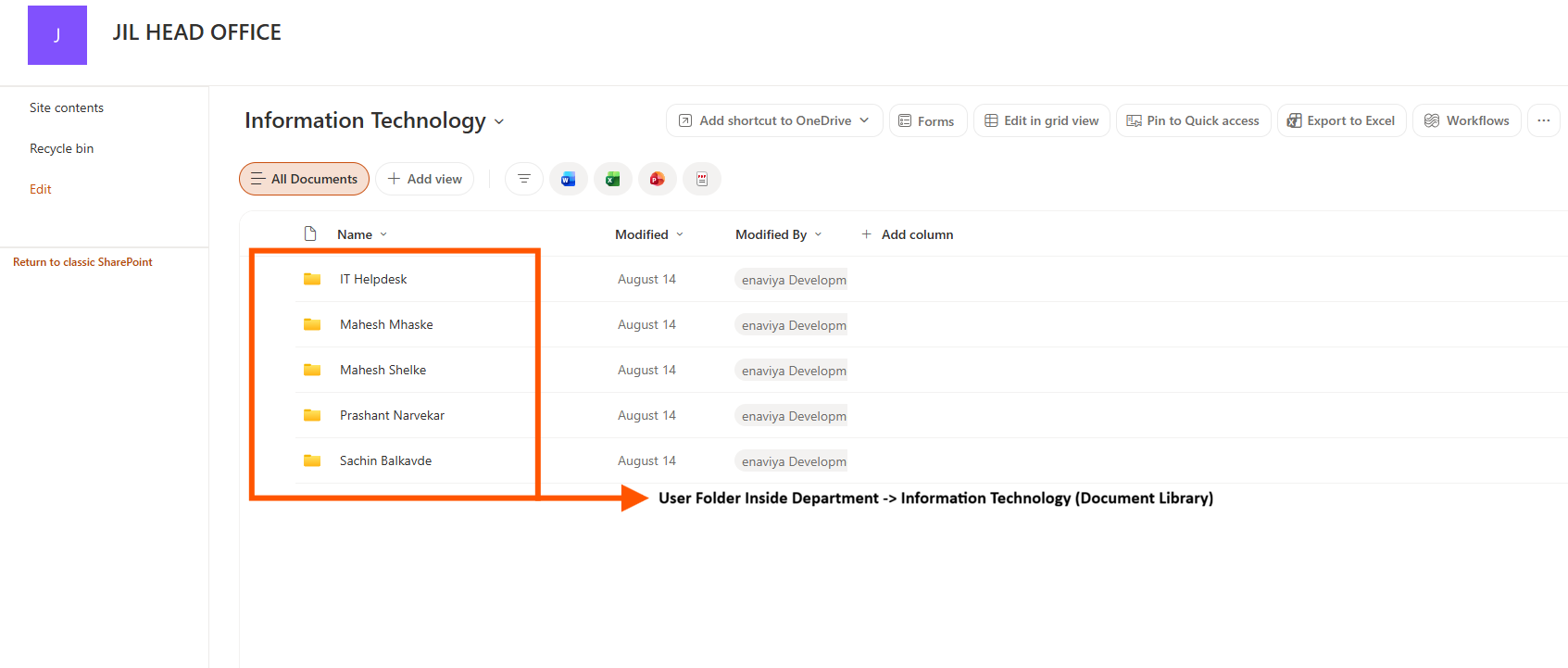
As per the client's requirements, we implemented a DMS on SharePoint Online. The system provides a clear structure for managing folders. The files in the folders are organized according to location, department, user, and desktop. Access rights have been specified according to the defined permissions. Users will be able to access assigned folders via Teams, OneDrive, and SharePoint.
Furthermore, the system allows users to upload and download documents. Users have access to edit files online and they are also allowed to search for the needed documents. Additionally, the system has the option for utilizing file recovery. Both folder creation and permission settings are automated through using PowerShell and Excel methods. This is done in order to maintain consistency of the folder structure as well as access rules.
Ready to Simplify SharePoint Document Management?
Automate document management and provisioning with a secure, centralized SharePoint Online solution from Enaviya Information Technologies.
Our Global Offices
India
#563-564 Niran Arcade, 3rd Floor, New BEL Road, Bengaluru, Karnataka 560094
+91-98452 05968 info@enaviya.comUSA
8682 SPRING GARDEN DR,
# 8205 KELLER,
TX 76244
South Africa
Suite J, 4th Floor,
165 West street, Sandton,
Johannesburg,
South Africa - 2031
Follow Our Social network
Challenges
Before the launch of the DMS, our client faced numerous difficulties in managing business documents. The storage of documents was carried out in various places, departments, users, and desktops. The challenges also included the problems users faced while trying to access the documents which are necessary. Also, managing access to and handling a large volume of data was a major task.
Complex document structure
An organization comprises a large volume of files and folders. Documents were classified according to location, user, department, and desktops. The management of this structure was quite difficult.Difficult Access Management
Different access was required for different users. Thus, managing access for each user was a challenging task. It was important to make sure that users had not gained any unauthorized access.Difficulty in finding documents
Users found it difficult to access the required documents in several folders. Therefore, it took more time to navigate to the appropriate file. This made document access level less convenient for users.Manual Folder Management
Creating and managing the folders for users and desktops was a repetitive manual task. This, in turn, made it difficult to manage the document structure.Large Data Migration
The organization had a large amount of data stored on a legacy drive. Moving large groups of files was very challenging. Transferring such large amounts of data would create storage issues.Challenges in Managing Old Data
The organization also had active and older files. Managing these files was quite complicated as users needed to know which files were up-to-date.Solution Implemented
As a solution, Enaviya launched a Document Management System (DMS) on SharePoint Online. It acts as a centralized location for managing all business relevant documents. The system comprises a simplified folder structure that helps to manage documents by location, department, user, and desktop. This system also provides easy access for users to their necessary documents. The system allows documents to be managed, searched, accessed, restored, and collaborated on.
Document Structure
DMS has been designed with an effective folder structure for managing business documents. It sorts according to category, location, department, and user type. This makes the document structure easier to manage.
Access Control
Access control is implemented at different levels. Users get access to the folders based on their assigned permissions. Users are permitted to manage documents only in the allowed folders. Whereas Admins will have full control.
User Folder Access
Every user has been assigned a folder for managing their respective documents. Users have access to their folders through SharePoint, Teams, and File Explorer, and they can also use OneDrive to access their files.
Managing Documents
Users can download and upload files. They can also edit documents online. The auto-save feature is also supported. Multiple users can work simultaneously on a single document.
Search
The system permits users to find files and folders. It also enables searching within PDF, Word, and Excel files. This means that it is now easier to locate a necessary document.
Version History
The system keeps prior versions of documents. Users can view previous versions of specific documents. Moreover, they can restore a previous version of a document when necessary.
Data Recovery
Deleted files can be recovered from the Recycle Bin. This feature enables users to recover files which are deleted accidentally. The data retention policy is also supported by system. This helps to the secure the important business files.
Automated Provisioning
Folder creation and access setup are automated. Folder structure and access details are defined in Excel. PowerShell uses these data to create the folders. Thus helps to reduce the manual work.
Migration Support
The system supports active data migration from legacy drive. The user can transfer the files into their assigned folders. Large volume transfers can be done in batches. An older data will remain as read-only archives.
How the Solution Works
DMS is easily accessible via SharePoint Online, and all users can easily log in and open their designated folders. Users are given access depending on their roles and permissions.
Access to the documents
Once the user logs in, they can easily access the folders allocated to them and view the stored documents. Furthermore, users can upload/download files as per the requirement. They also have an option to edit Office files via online.
Document Searching
Users have the ability to search documents from their name or content. Search feature is applicable for PDFs, Word, and Excel files, so it helps users to find appropriate documents more easily.
Data Preparation
The process starts with the Excel file, which contains all the data regarding locations, departments, users, desktops, and access. Data verification is done prior to the setup.
Folder Creation
Using the data from Excel, the system creates the required structure. It creates all department libraries, user folders, and desktop folders. Existing folders are verified before creating any new folders.
User Onboarding
The Excel spreadsheet is updated to include new users. The provisioning process then creates the required user folder and provides the required access. However, existing data will not be affected.
Core Modules Implemented
The system comprises key modules that support regular management of business documents for an organisation. These modules manage document hierarchy, folder creation, access permissions, user configuration, and system maintenance. They also support the administration of the DMS and help to keep the documents organized.
Provisioning Engine
Through the provisioning engine, the required structure for SharePoint is created. It reads the Excel data and builds the defined hierarchy.
Excel Configuration
The Excel template contains the structure and access details. It is the main source of information for the provisioning process.
Permission Management
The system controls access configurations for libraries and folders. It executes the access policies defined in the Excel file.
User Management
The system supports user onboarding. The information related to users is connected to the proper folder and the access configuration.
Verification and Documentation
Before something is created during provisioning, it ensures the input data is validated. It is also responsible for recording the process and creating logs for review purposes.
Administration and Governance
The solution supports proper management of SharePoint structure. It helps to prevent any unauthorized changes to the folder setup.
Final Result
The DMS has improved the way the organization deals with its business documents. It has introduced users to a more systematic method of obtaining and handling their files. In addition, it has simplified document access and improved control over the business data. The organization has gained better support for file recovery and collaboration.
Improved Document Management
The organization now uses a more efficient method of tracking and storing documents. This has made daily document work easier.
Faster Document Access
With the new system, users can now access important documents more easily. This saves time during their important work and improves productivity.
Improved Document Control
Now the organization has better control over its important business documents. This solution has helped to reduce the risk of unauthorized access. Thus, the organization’s data is secured.
Improved Team Collaboration
Multiple team members can work on the same document simultaneously. This makes it easier for the team to review and update the documents together without any confusion.
Safer File Recovery
Whenever necessary, important files can be recovered. This helps to minimize the chance of losing any important business data.
Less Manual Work
The automation helps to cut down on repeated manual activities. Thus, document management is simplified.
Tools & Technologies Used

SharePoint Online
Industry
- Manufacturing
Copyright © 2026 Enaviya Information Technologies Pvt. Ltd. All rights reserved
