
Service Request Portal (Ticketing Tool) - Case Study
Client Overview
Our Client has built a reputation as a trusted market leader in the domains of Security, Facility Management, and Cash Logistics Solutions. The company has been in the business for over five decades and has a strong presence across India and the Asia-Pacific region. To deliver scalable services, it combines the combination of people, processes and technology effectively.
The company required a structured way to manage service requests through its various business teams. Hence, they collaborated with Enaviya to develop a Service Request Portal using SharePoint. The portal combines request creation, ticket allocation, tracking, SLA management, communications, and closure in one centralized location.
Client Requirements
The client required a simple and organized portal for handling business service requests. The task was to replace the informal Email and phone follow ups with a digital process. The users needed a modern solution to create requests and track them. It was also necessary for every request to have its own ticket number, assigned owner, targeted date of closure, as well as a history of all activities. The portal also required support for SLA tracking, team assignment, documentation, comments, and timely updates.
Develop a centralized service request portal utilizing SharePoint
- Permit users to create as well as manage their requests
- Create a unique ticket number for every request
- Organize requests according to the departments, services, queues, and procedures
- Route requests to the respective SSC department
- Allocate the ticket to the technician on the basis of availability and workload
- Set closure date goals for different procedure types
- Track SLA and ticket processing duration
- Permit users to comment as well as attach files
- Maintain the full record of ticket activities
- Permit technicians to escalate tickets when necessary
- Collect user feedback and rating
- Generate reports and export any data to Excel
- Set up role-based access for different users
- Enable admins to control users, technicians and master data
Project Summary
The client was looking for a solution to manage the service request process in a better way. The client wanted a centralized system that allow to create, assign, track, and closing service requests. The existing process involved informal email and phone follow-ups. The new portal required a unique ticket number, assigned owner, target closure date, and tracking history of activities associated with the ticket. In addition, users also required to check the status of the ticket, add comments, and attach relevant files. Furthermore, the SSC team wanted to have full control over the assignment of service requests, SLA, and turnaround time of service requests.
To meet these requirements, Enaviya created a Service Request Portal (Ticketing Tool). It is hosted on the organization’s SharePoint Environment. The portal makes use of the existing Microsoft 365 work account for login purposes. Users have the option to submit service requests, choose the department, service type, queue, and process. Furthermore, users can also upload any necessary supporting documents.
This tool provides automated ticket assignment according to the availability and workload of technicians. Furthermore, it tracks the SLA and time taken to complete a service request. Users can also check the entire ticket history through the portal. The system also supports feedback, ratings, reports, and Excel export.
Simplify Service Requests and Improve Response Times
Make it easier to submit, track, and resolve service requests with a centralized portal. Get Started Today
Our Global Offices
India
#563-564 Niran Arcade, 3rd Floor, New BEL Road, Bengaluru, Karnataka 560094
+91-98452 05968 info@enaviya.comUSA
8682 SPRING GARDEN DR,
# 8205 KELLER,
TX 76244
South Africa
Suite J, 4th Floor,
165 West street, Sandton,
Johannesburg,
South Africa - 2031
Follow Our Social network
Challenges
Before the implementation of the Service Request Portal, our client faced challenges in dealing with service requests through emails and phone calls. The process was very complicated and did not allow them to perform tracking of requests, manage ownership, and monitor SLAs. It was also difficult to maintain records of their requests. Therefore, they required a centralized solution to manage the entire service request process in a structured way.
Manual Request Management
The existing process relied on emails and phone calls. This made it difficult to organize, track, and manage the request effectively.Request Assignment
Requests were not automatically assigned to the respective SSC technician. Instead, the company was utilizing a manual process. This made it difficult to manage requests.Request Tracking
The users had no idea about the current status of the request. They were unaware of the requests whether it was in progress, pending action, or completed.SLA Management
The company did not have complete information about target closure dates and turnaround time. As a result, they found it difficult to identify delays and manage requests in a specified timeline.Document Management
Supporting documents were shared via e-mails. Thus, it was extremely hard to keep all the documents in one place along with the request details.Communication and Notification
Updates were communicated manually. This resulted in missed actions and delays.Workflow Management
There was no structured workflow for the request process. A clear workflow with ownership is necessary from start to finish.Process Visibility
The managers had limited visibility into pending and completed requests. Thus, it was quite challenging to track requests both by department and technician.Audit Trail
The activities related to requests were not kept in a single database. Therefore, the process of tracking comments, documentation, status updates, and results was not feasible.Solution Implemented
Enaviya has developed a Service Request Portal using SharePoint (Microsoft 365), through which employees can submit service requests and track their status. The users can choose the department, type of service, queue, and process of their request. The users can also add their comments and any supporting documentation. The portal handles ticket assignments, SLA tracking, reminders, feedback, and request history. The portal helps the SSC team to carry out their work in a structured way. Thus, it helps to reduce manual work.
Centralized Service Request Management
Users can submit requests for service through the portal. They can choose the department, service, queue, and process through the portal. This ensures that every request is directed to the appropriate department.
Automated Ticket Assignment
The portal automatically assigns new tickets to the right SSC technician. In the assigning process, technician availability and workload are taken into consideration. This helps to assign new tickets to available team members.
SLA and Target Date Tracking
The portal calculates the expected due date based on the chosen process. It also utilizes the previously established resolution time and working days. The SLA indicator shows the time left to complete the ticket within the target time.
Ticket Tracking
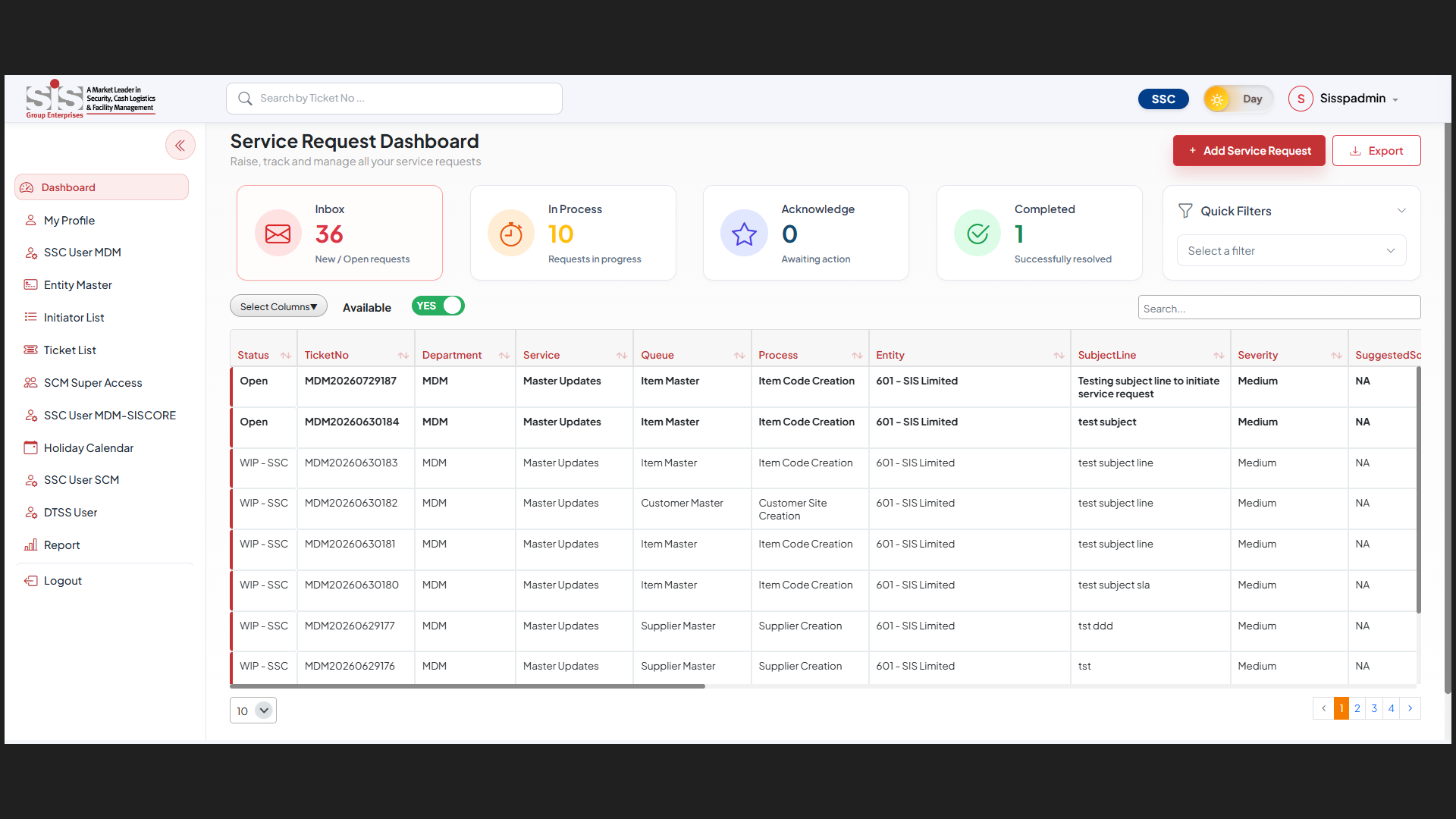
Users can always follow the progress of their requests through the Service Request Dashboard. They can also search for a ticket using its unique ticket ID. The page displays owner status, SLA, and other key information.
Comments and Attachments
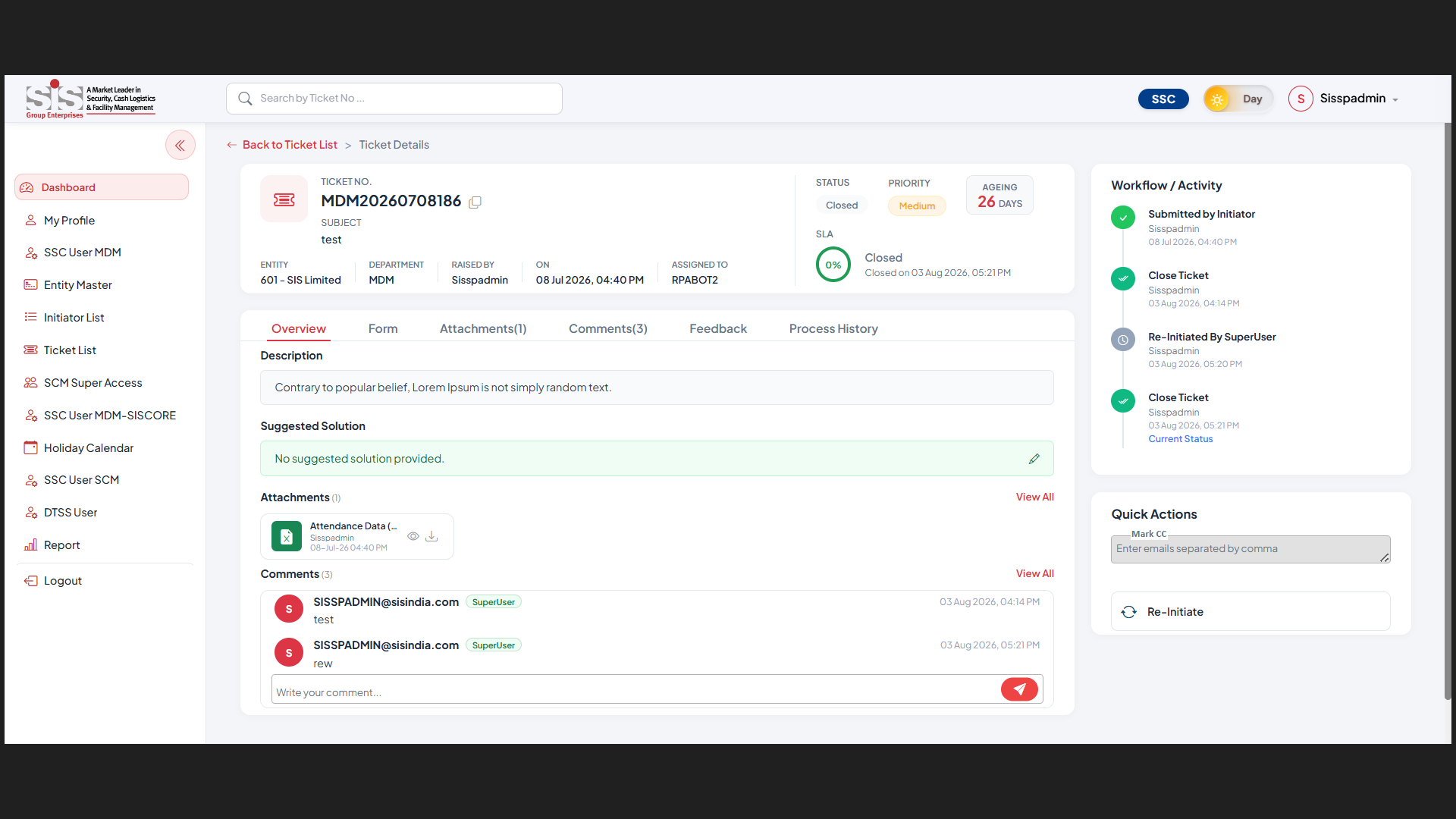
Users have the ability to comment on their tickets. They can also attach documents that support their requests. This means that users and SSC staff can keep their necessary information with the ticket.
Complete Ticket Activity History
The portal maintains a history of ticket activities. Users can see who was working on their request, when it was done, and what was the outcome of the action.
Feedback and Rating
The portal sends alerts at key stages of the request. After the task is completed, users are given the opportunity to express their opinion on the service provided to them. They also have an option to rate the service provided to them based on their experience.
Reports and Export to Excel
The portal has a reporting tool that allows users to track requests and issue orders. Only Authorized users can export ticket data to Excel. This helps the teams to review and analyse request data.
How the Solution Works
The Service Request Portal is used to handle the entire request procedure from one centralized location. This portal lets users create requests, follow the progress of the requests, and interact with the SSC team. In addition, it controls the entire assignment of tickets, SLA monitoring, and ticket closure.
Login Process and Request Creation
Users have to log in using their Microsoft 365 work account. Access is determined according to their role. The users choose the respective Department, Service, Queue, and Process. They can add the request details and also attach supporting documents.
Ticket Creation and Assignment
The portal generates a unique ticket number and also determines the target date of closure and starts the SLA (Service Level Agreement). Ticket will be assigned to a technician based on their availability and workload.
Processing Requests
The requests are processed by technicians. IF more information is needed, users can respond through the same ticket.
SLA Tracking
This system keeps track of the service level agreement (SLA) and shows the status of the request.
Closing Tickets
The technician closes the request's ticket after fulfilling the request. The user can give feedback and a rate on the service.
Core Modules Implemented
Enaviya has designed various modules for the Service Request Portal to support different users as well as business functions. Each module manages specific phases in the request process. The modules include request creation, user dashboard, administration, and service controls. All these features make it easier to manage requests across teams of various users through a single, structured system.
Service Request Form
This module offers the form for generating new requests. It captures key details according to the chosen procedure.
Dynamic Request Field
The request form utilizes required fields such as Division, Service, Queue, Process, and Sub-process. The available options change based on the previous selection.
Request Dashboard
The dashboard serves as the main working area for users. It displays requests as per the role and task queue. Additionally, it allows users to search and filter relevant information.
Technician Workspace
This module assists SSC technicians in handling their job responsibilities. The technicians can set their availability and proceed to work on tickets in their queue.
Master Data Management
Super users can take charge of managing the master lists that the portal uses. This includes technician lists, entities, initiators, tickets, as well as holiday calendar.
Supplier Validation
For all the selected Supplier Master requests, the portal verifies supplier details using external sources. It is capable of verifying the GST, MSME, TAN, CIN, and PAN of the supplier.
Ticket Reinitiating
The users can send back the completed ticket to the SSC team if the request still requires action. The same ticket and all the history will be retained.
Escalation Management
The post-closure escalations can be recorded by super users. Also, they can add remarks. The information provided is also a part of escalation reports.
Service Reports
The reporting module generates data about departments, technicians, processes, turnaround time, and other ratings. This assists authorized users in reviewing the service activities.
Final Result
Implementation of the Service Request Portal turned out to be successful. This solution allows the company to manage service requests very efficiently through a central platform. Service request creation, tracking and closing are easily done by users. The system also comprises ticket assignment feature, SLA tracking capabilities, communication and reporting feature. This has made the process much organized and easy to handle.
Centralized Request Management
Every service request, documents, comments, and activities are managed from the centralized location. This makes tracking requests much easier.
Automated Ticket Assignment
Tickets are allocated to available technicians as per workload. This means there is no need to manually allocate requests.
Enhanced Request Tracking
The status of requests can be tracked for users. Also, managers are able to see requests that are completed or pending.
Improved SLA Monitoring
The portal helps to track deadlines and turnaround times. This helps the SSC team keep an eye on the requests that have been made in time.
Better Document Management
Documents and comments remain with the relevant ticket. This makes it easier to access the request information.
Transparent Reporting
Reports provide information about departments, technicians, processes, turnaround times, and ratings. This allows authorized users to monitor the service operations.
Tools & Technologies Used

Azure Active Directory

Microsoft 365

PnPJS

Power Automate

React

SharePoint Framework (SPFx)
SharePoint Insights

Single Sign-On (SSO)

Tailwind CSS

TypeScript
Industry
- Cash Logistics
- Facility Management
- Security
Copyright © 2026 Enaviya Information Technologies Pvt. Ltd. All rights reserved
