
Plant & Engineering MOC Application Development - Case Study
Client Overview
Our client is a major producer of specialty engineered chemistries for the hydrocarbon and industrial chemical sectors. The company offers innovative solutions to refineries & petrochemical plants. Apart from having operations in India, Brazil, and Southeast Asia, the company is continuously working towards expanding its global presence.
The company needed a systematic method to manage the Management of Change (MOC) process as the company controls engineering and plant changes across various locations. Thus, the company partnered with Enaviya to create a Plant & Engineering MOC application on SharePoint Online. The application integrates change requests, reviews, approvals, documents, and tracking in one place.
Client Requirements
Our client required a simple and organised system for plant and engineering changes. The main objective was to simplify the handling of the MOC process. Thus, the company needed to have one platform for all MOC requests, approvals, documents, comments, and reports. Furthermore, the platform needed to be secure and scalable, that could support different teams and levels of approval.
- Developing a Plant & Engineering MOC application within SharePoint Online.
- Creating an integrated system for managing MOC requests.
- Enable users to create MOC requests by providing details.
- Enable users to submit details of changes, including risks and supporting documents.
- Direct the MOC requests to the appropriate teams who are going to review and approve.
- Allow HSE and Process Safety teams to review every MOC request.
- Allow reviewers to accept or reject requests, so they can leave their comments.
- Measure the duration of every approval stage.
- Introduce dashboards and reports for better transparency.
- Provide transparent visibility into the current status of each MOC request.
- Generate MOC reports in PDF format, so that they would be useful for documentation and auditing purposes.
- Keep thorough records of all approvals, reviews, and actions.
- Ensure that access to the MOC data is restricted based on roles.
- Enable authorized people to manage and keep track of all active tasks.
- Make sure that there is a systematic way to work on any MOC requests.
Project Summary
Our client needed a simple and integrated way to manage the MOC process across its manufacturing sites. The existing process was quite different in terms of managing requests, approvals, documentation, status of requests, and other activities related to MOC.
By utilizing SharePoint Online ( Microsoft 365 ), Enaviya developed a Plant & Engineering MOC application that automates the entire MOC workflow. The employees can submit MOC requests, upload documents, and track the status of the request from a single platform.
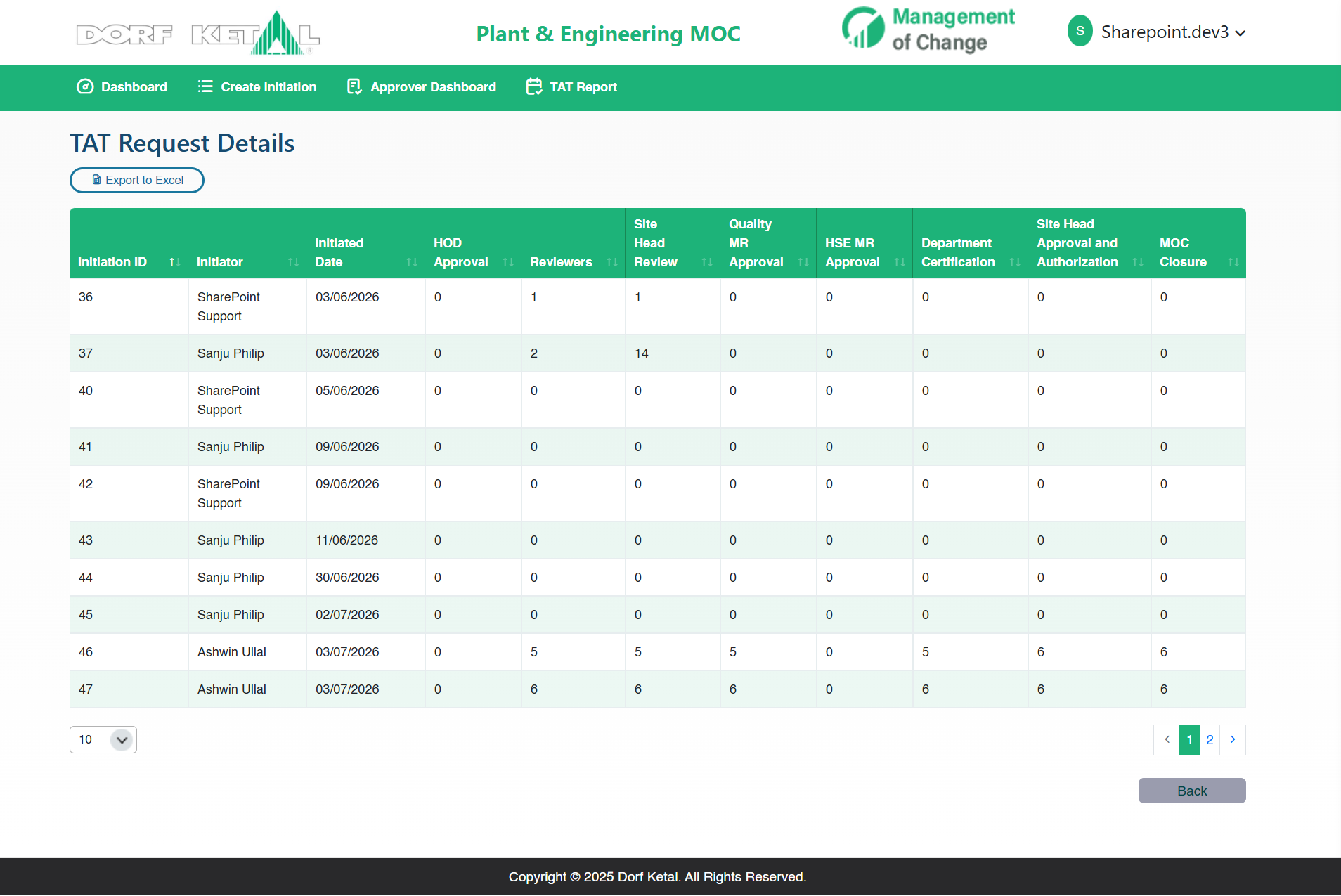
The app manages multi-level approvals, notifications through email, reviews based on roles, and monitoring of procedures. It contains dashboards that highlight the requests that are either pending or have been completed. TAT reports allow teams to keep track of the time taken for approval and determine the delay in the processes.
Overall, our new solution replaced the old paper-based method with a systematic, clear, and centralized MOC system. Thus, it improved team coordination and made approvals much easier to keep in track. It also provided a manager to have a better visibility into the entire change process.
Simplify Your Plant & Engineering MOC Process
Centralize MOC requests, reviews, approvals, documentation, and tracking in one structured application. Talk to Our Experts
Our Global Offices
India
#563-564 Niran Arcade, 3rd Floor, New BEL Road, Bengaluru, Karnataka 560094
+91-98452 05968 info@enaviya.comUSA
8682 SPRING GARDEN DR,
# 8205 KELLER,
TX 76244
South Africa
Suite J, 4th Floor,
165 West street, Sandton,
Johannesburg,
South Africa - 2031
Follow Our Social network
Challenges
Before using the Plant & Engineering MOC application, our client experienced difficulties in managing changes across manufacturing sites. The existing process made it quite difficult to track requests, manage approvals, and maintain documentation. Therefore, our client needed a solution that would simplify the management of the whole MOC workflow in one centralized location.
Manual Process
The existing process was completely dependent on paper-based requests. This made it difficult to manage and track MOC requests.Multiple Stages of Approval
Each request had to be reviewed by several departments. Achieving manual approval was time-consuming and caused delays.Document Management
Supporting documents, review remarks, and approvals need to be tracked for every request. Finding the right document was not always easy.Request Tracking
Better visibility was required for employees and managers regarding the status of MOC requests. It was very difficult to know who was responsible for a request and which action was pending.Workflow Management
Each request change was required to pass through multiple approval stages. Thus, the management required a transparent and controlled workflow to manage the entire process.Communication and Notifications
Approvers needed quick updates once a request reached their stage. Manual communication was leading to missed actions and delays.Visibility of Processes
The managers required a user-friendly method to check requests which are still pending, along with the ones which are already finished or held up.Response Time
Managers wanted to understand the time spent by requests in each of their approval stages. This could help to identify delays and make the MOC process better.Solution Implemented
Using SharePoint Online (Microsoft 365), Enaviya created a MOC application called Plant & Engineering MOC in which employees can submit their requests for change easily. Users are able to add all kinds of change information along with any documents that support their request. The application also capable of managing reviews, email notifications, approvals, and request tracking. Thus, it helps the team to follow a structured process and decrease manual work.
Digital MOC Request creation
The employees can create the requests online by adding various details like change specifics, cost, benefits, risks, and supporting documents. This allows for maintaining all the relevant information in one centralized location.
Automated approval workflow
The requests move through all the stages of approval in one system. It allows one to follow a clear and precise procedure without having to do manual follow-ups. This helps the teams to complete the review process and make approvals on time.
Role-Based Review Process
Requests will be sent to the appropriate review teams. Reviewers can provide answers to the queries, add comments, and approve requests. This make sure the right teams are involved in the verification of the changes.
Automated Email Notifications
Approvers receive email notifications when it becomes necessary to take action. The initiators also get the updates about the approvals, holds, and rejections. This helps to reduce the delays and missed actions.
Centralized Document Management
Users have the ability to upload the relevant documents when submitting MOC requests. In this process, reviewers will have access to the necessary documents. All documents submitted with the MOC will stay linked with the request.
Tracking MOC Status
At any time, Users can monitor the status of each request. They can determine if the application is on hold, accepted, or declined. This simplifies tracking the status of each application.
Complete Workflow History
The system stores records of all approvals, remarks, hold, and rejection. Each action indicates the user and date information. Thus, a transparent record of the total MOC process is created.
Dashboard and TAT Reports
The dashboard gives a quick overview of the MOC requests across the locations. While the TAT reports indicate the time spent on the various stages of approvals. Managers can use these reports to monitor the delays.
Better MOC Management
Our solution enables a structured way of managing the changes in manufacturing locations. This reduces manual work and enhances process visibility. It also helps teams to effectively manage approvals and documentation.
How the Solution Works
The Plant & Engineering MOC app combines the entire change management process into one system. Employees are able to submit MOC requests and updated their associated information and documents. The request is then evaluated by the approvers and reviewers at every step.
Login and Submission of MOC Requests
Users can sign in with their existing Microsoft 365 account for secure access and then submit the MOC request online. They can provide certain details regarding the request, such as change details, objectives, cost, risk, benefits, and can attach supporting documents.
HOD and Department Reviews
The request will be submitted to the designated HOD. They will be responsible to approve, hold or reject the request. The request is forwarded to the appropriate review departments. Each department has the authority to add comments and answer the questions provided by the reviewing teams. After completing the inspections in all departments, the Site Head reviews the request.
Final Approval and Closure
The Quality MR, HSE MR, and certification from all departments are carried out prior to the final approval process. After that, the Site Head gives final approval and make a closure.
Tracking and Notifications
Users can monitor the progression of the MOC request. Various email notifications are sent when it is time to perform certain actions for every stage.
Reports and Dashboard
The dashboards display the MOC requests made at different locations. TAT reports assist managers to track the approval processing time and identify the delays.
Core Modules Implemented
Enaviya has designed and developed key modules for the Plant & Engineering MOC application. These modules facilitate the basic MOC functions and daily work. It helps users by allowing them to manage change details and review records from one centralized location. Furthermore, they help in keeping the MOC procedure organized and easier to manage.
Initiation Management
Capture all the information related to proposed change. Further, it assigns necessary site, department, type of MOC and main users.
Reviewer Configuration
Enables admin users to specify review functions for every site. Besides, it offers various types of review questions for respective functions.
Master Data Management
This allows admins to manage locations, departments, functions, objectives, and all relevant employee details.
Management of Master Data
Assist managers in overseeing positions in organizations like departments, locations, duties, types of MOC, target, and employees. Consequently, it helps maintain the accuracy and currency in data of the system.
Approval Role Management
Connects employees to roles like Site Head, CEO, or reviewer. This assist in assigning the right users to each MOC stage.
Review Question Management
The admin has been able to create and modify questions for every reviewer function. This ensures that the process remains clear and consistent.
MOC Search
This feature allows users to look for requests by MOC ID, name, location, or type. It makes it easier to locate the exact record.
MOC List Management
Displays all the pending, rejected, and accepted requests. Allows users to filter and sort the data.
PDF Exporting
Enables users to download the entire MOC requests in PDF format. This supports audits and record keeping.
Excel Export
Allow users the capability to export MOC and TAT data to Excel. This will be useful for conducting additional analyses.
Final Result
The Plant & Engineering MOC application has been successfully implemented. This tool assists the organization in managing its MOC process in a more efficient manner. Users can create, review, approve, and monitor requests through one platform. Manual work has decreased. The visibility and control of the process have improved. Furthermore, our solution has made MOC management clear, simple, and more structured throughout the organization.
Centralized MOC Management
All MOC requests, documents, reviews, and approvals are handled in one location. This simplifies management of the process.
Fast Approval Process
Automated workflows send the request to the appropriate user in each process stage. This results in fewer delays and a smoother approval process.
Enhanced Process Visibility
Users are able to monitor the status of MOC requests. Managers can also identify which requests are still pending or delayed.
Better Document Management
The supporting documents and review records remain with each MOC request. This makes information easier to track.
Transparent Reporting and Monitoring
MOC activity is visible via dashboards and TAT reports. This allows managers to monitor requests process easily.
Improved MOC Process
The digital workflow replaced a paper-based process. Our solution created a better organized, transparent, and easier to monitor MOC process.
Tools & Technologies Used

Azure Active Directory

Microsoft 365

PnPJS

Power Automate

Power BI

React
SharePoint Framework (SPFx)
SharePoint Insights

Single Sign-On (SSO)

Tailwind CSS
TypeScript
Industry
- Chemical Manufacturing
- Manufacturing
Copyright © 2026 Enaviya Information Technologies Pvt. Ltd. All rights reserved
