
NFA SharePoint Migration - Case Study
Client Overview
Our client is a leading mining company in India. It produces zinc, lead, silver, and cadmium. The organization manages large mining and metal manufacturing facilities. It manages many business processes and applications to support its operations.
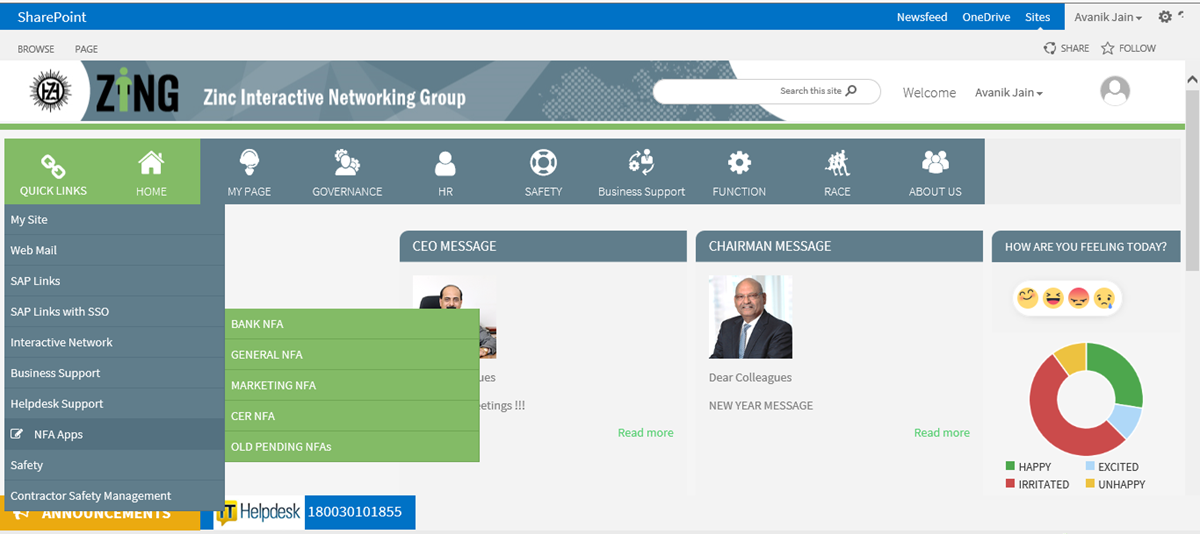
The company was utilizing the NFA (Note for Approval) application on older versions of SharePoint. It was used for managing the internal approval processes. Thus, our client needed to migrate the application to a new version of SharePoint. However, the client wanted the existing data, workflows, functions, and user access to remain available after the migration.
Client Requirements
Our client needed to migrate the NFA application from the old SharePoint environment to a new version. The aim was to successfully upgrade the software without affecting the approval process. The application stored important data, workflows, and user access. All these areas needed to be retained and verified during the migration process.
- Migrate the NFA application from the previous platform to the new SharePoint version.
- Protect existing business data and content during the migration process.
- Preserve the existing NFA approval process.
- Preserve existing application functionality.
- Review existing custom parts and dependencies.
- Verify application compatibility with the new platform version.
- Validate user rights and permissions post migration.
- Make sure the existing workflows continue to work after the process.
- Perform functional testing post migration.
- Perform regression testing before production rollout.
- Assist with User Acceptance Testing (UAT).
- Reduce disturbance to business users during the migration process.
Project Summary
Our client required an improved way for handling its NFA approval process. The application was operating on an outdated SharePoint version. Thus, the client required migration to a new SharePoint version without affecting its existing functions. The application comprises essential business data, workflows, and user permissions that needed to be retained.
As a solution to this issue, Enaviya migrated the NFA application from its older SharePoint version to an updated version. The process included a review of the application, data migration, compatibility checks, and validation of workflows. Additionally, the key application functions were checked, and user access was verified after migration.
Functional testing, regression testing, and UAT were performed before going into production. This made it possible for the client to switch to the new SharePoint platform with less disruption to their current approval process.
Make Your NFA SharePoint Migration Simpler
Simplify migration, improve document accessibility, and create a more organized SharePoint experience with Enaviya Information Technologies.
Our Global Offices
India
#563-564 Niran Arcade, 3rd Floor, New BEL Road, Bengaluru, Karnataka 560094
+91-98452 05968 info@enaviya.comUSA
8682 SPRING GARDEN DR,
# 8205 KELLER,
TX 76244
South Africa
Suite J, 4th Floor,
165 West street, Sandton,
Johannesburg,
South Africa - 2031
Follow Our Social network
Challenges
Prior to the migration, the client faced several problems with the existing NFA app. This application was functioning on the old version of the SharePoint platform. Additionally, it also contained important business data, workflows, custom components, and settings related to user access. All these components made it difficult to maintain the app on the outdated platform.
Old SharePoint Platform
The NFA application was operating on the older version of SharePoint. This limited the ability to support the utilization of modern tools.Customization Complexity
The application consisted of custom components along with dependencies. This made it very complex to maintain the application.Complicated Application Structure
The app included several interconnected features and dependencies. Hence, it was hard to implement changes without affecting different parts of the app.Data Management Concerns
The app contained important business data. The management of this data within the outdated SharePoint environment was a major problem.Access Management Concerns
The application had existing user rights and permissions. Management of these settings within the existing system was a major challenge.Limited Application Support
The existing application had completely dependent on the older SharePoint environment, which created challenges in supporting & maintaining the app as business needs evolved over time.Solution Implemented
To address the above challenges, Enaviya successfully migrated the NFA app from the old SharePoint environment to the new SharePoint environment. The project itself consisted of reviewing the app, migrating the necessary data, compatibility checks, and testing. The existing app functions, workflows, and user access were also verified after the migration process. Additionally, Testing and UAT were performed before the production rollout.
Application Migration
NFA application was transferred from the old SharePoint platform to the upgraded version. All relevant components of the application have been included in this migration process.
Data and Content Migration
Necessary business data and content have been migrated to the new SharePoint platform. The data was checked and validated to ensure its availability after the migration process.
Review of Custom Components
During the migration process, a thorough review of the existing custom components and dependencies was conducted. This helped to determine that the required components were worked well in the new environment.
Compatibility Check
The application was evaluated for compatibility with the new version of SharePoint. Any areas that needed attention were identified and reviewed.
Workflow Validation
The existing NFA workflows were also verified in the new version of SharePoint. This helped us to confirm that the approval process continued to work as expected in the new platform.
User Access Validation
Access and permission rights of the users were evaluated before and after migration, and it was confirmed that users were able to access their assigned tasks.
Functional Testing
Once the migration process was done, functional testing was performed. This allowed us to verify whether the NFA application was performing as expected.
Regression Testing
Regression testing was performed on the application to determine whether the functions of the existing application had been affected by the migration. This helped in identifying any issues that could lead to application failure.
UAT and Go-Live
The migrated application was tested during UAT. After successful validation, the application was made ready for organizational use.
How the Solution Works
The NFA application is made available via the SharePoint portal for user access. They can utilize the app based on the assigned user permission. Users able to work with NFA requests via the system. In addition to submitting requests to NFA, users can track their requests throughout the necessary review phases.
User Access
Users are able to log into the SharePoint site via their existing work account. Depending on the role assigned to them, the access level varies.
NFA Request
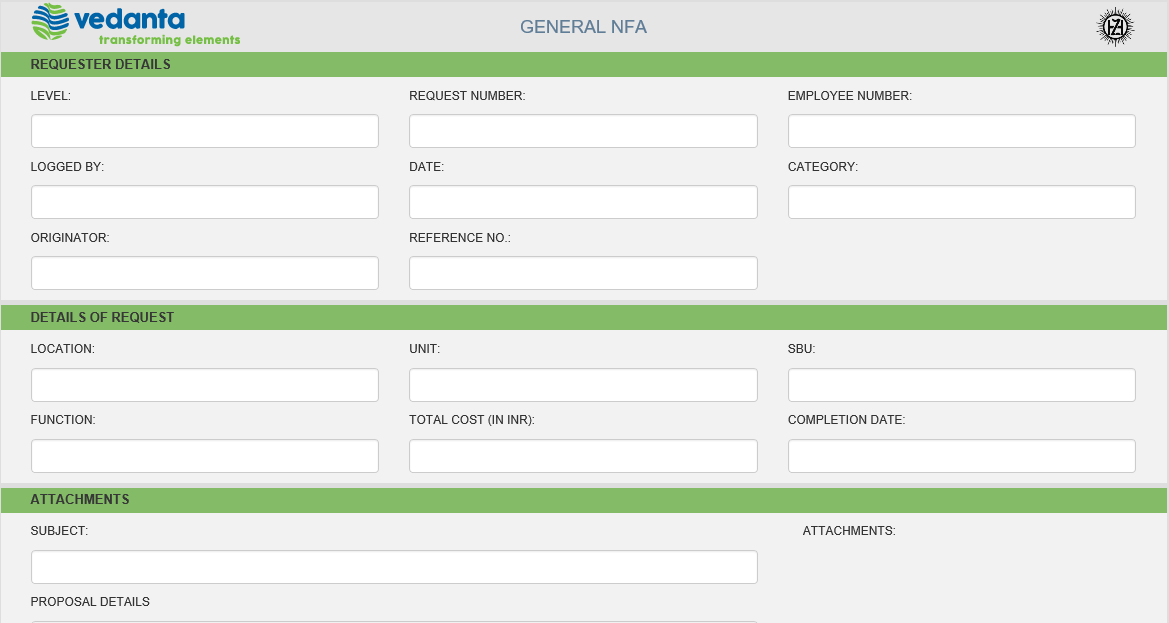
Users can create and submit NFA requests through the application via the request form, where they input all the necessary details.
Approval Procedure
The system sends each request through the necessary approval stage. The request goes through the process of approval.
Review and Action
Approvers can see the details of the request. They can perform the required action at their approval stage.
Request Tracking
Users can keep track of their requests. They are able to check both the pending and concluded requests. Additionally, users can view the request history.
Core Modules Implemented
Final Result
The migration facilitated the transfer of the NFA application from the old version to a new SharePoint environment. Furthermore, the existing workflows continue to operate after migration. There was also assurance that the app data and user access were preserved. The app was tested before it was made available to users.
Modernized SharePoint Platform
NFA apps now run on the new SharePoint platform. It is now the more appropriate platform for maintaining operations.
Better application support
The upgraded platform facilitates improved conditions for the maintenance and updating of the application. Thus, future upgrades will be easier to manage.
Continued access to business Data
Necessary business data and content were preserved during the migration process. This helped the organization to continue using its existing data without loss or misplacement.
Reliable Software Use
The testing phase confirmed the functions of the app worked as expected. This helped users rely on the application for their approval tasks.
Uninterrupted Access for Users
Users are able to access the NFA application with the same rights as before. The users will continue to work without any interruptions.
Less Disruption
The migration was well planned and tested before it was implemented. Thus, it helped to reduce the impact on business users during the migration process.
Tools & Technologies Used
SharePoint
Industry
- Metals & Mining
Copyright © 2026 Enaviya Information Technologies Pvt. Ltd. All rights reserved
