
Lease Premise Management System - Case Study
Client Overview
Our client is a leading provider of Security, Facility Management, and Cash Logistics Solutions. The company offers these services across India and the Asia-Pacific region. It integrates people, processes, and technology to provide reliable services. The company serves customers across different business sectors.
The organization needed a structured way for managing its leases and rental agreements. Users also required a simple way to manage lease documents. Therefore, the organization partnered with Enaviya to create a Lease Premise Management System, which was based on SharePoint.
Client Requirements
The client was looking for a system that would help to manage lease premises and rental agreements in an efficient way. The project goal is to create a clear process for adding, reviewing, and dealing with lease records. It is also important for the users to have a convenient way to input the lease details and track them. In addition, the approval team should have clear visibility of the pending lease records and their status on approval.
- Create a centralized system for lease premises records using SharePoint.
- Allow users to create and manage records of lease premises.
- Capture details related to vendors and agreements in the system.
- Store data related to lease dates, tenure, lock-in period, and extension of the lease.
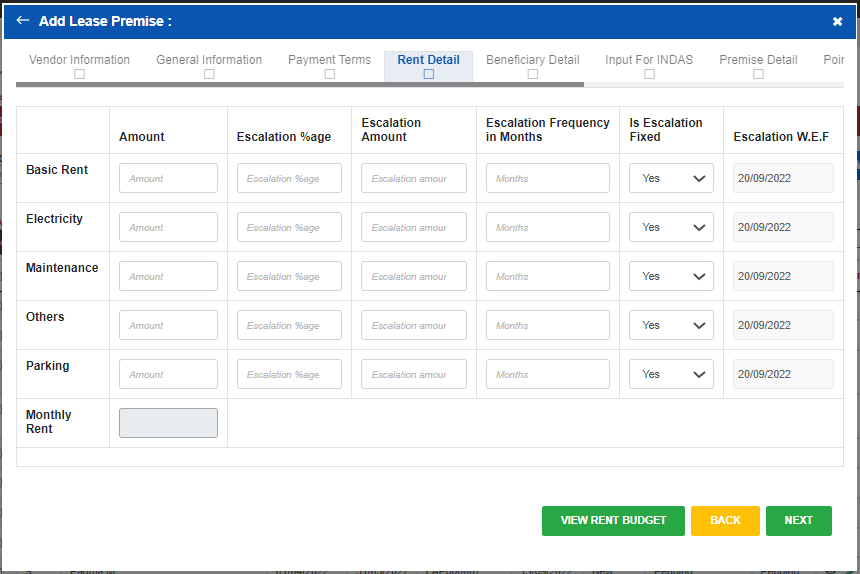
- Maintain information related to rent payments and escalations.
- Capture details of beneficiaries, banks, and payments.
- Capture information related to premises and site allocation.
- Allow users to upload lease agreements and related documents.
- Prevent duplicate lease records from being created.
- Enable users to search existing records and review them.
- Enable Super Users to approve or reject records.
- Enable the user to modify lease records before final approval.
- Allow users to renew, extend, or close lease records.
- Integrate vendor and required master data with Oracle Fusion.
Project Summary
The client needed a more efficient way to administer lease premises and agreements. The process involved several details like vendor info, rent, terms of payment, documents, and approvals. It also needed to be simple enough for users to create and manage their leasing records
In order to meet this need, we have developed a Lease Premise Management System using SharePoint. The system enables users to create lease records and enter relevant information. The information is categorized into various sections according to the lease requirements.
The system provides the ability to approve or reject leases. Furthermore, it supports lease progress through renewal, extension, and cancellation. Users can search records, upload documents, and track the current status. It also supports integration with Oracle Fusion for any necessary master data.
Looking for a Smarter Lease Premise Management System?
Simplify lease tracking, automate processes, and manage your premises efficiently with Enaviya Information Technologies.
Our Global Offices
India
#563-564 Niran Arcade, 3rd Floor, New BEL Road, Bengaluru, Karnataka 560094
+91-98452 05968 info@enaviya.comUSA
8682 SPRING GARDEN DR,
# 8205 KELLER,
TX 76244
South Africa
Suite J, 4th Floor,
165 West street, Sandton,
Johannesburg,
South Africa - 2031
Follow Our Social network
Challenges
Prior to the introduction of the Lease Premise Management System, the organization was managing the lease premises manually. The process involved handling a huge volume of lease and rental data. Therefore, it was quite challenging to keep the records up to date. Keeping track of approvals and the terms of the lease was also difficult. Managing information on agreements, vendors, rents, and premises was not easy from one place. Thus, it slowed down the process.
Lease Records Management
Handling multiple lease records caused challenges in keeping the information accurate and current. It also increased time spent in reviewing and maintaining lease records.Duplicate Records
There was a risk of generating duplicate lease records corresponding to the same premise or lease agreement. Such a condition could lead to duplication of information.Difficulty in Managing Lease Documents
The necessary documents related to lease agreements were required to be organized along with the lease information. Thus, managing these documents was difficult and it was time consuming.Difficulty in Tracking Approvals
It was difficult to keep track of ongoing lease records and the approval status of the lease. There was a need for users to have better information regarding the approval process.Difficulty in managing Lease Renewals and Extensions
Lease renewal and extension management require the update of lease information and other records. Keeping all lease details up to date was quite challenging.Complexity in managing lease data
The lease records contain important information regarding vendors, lease payments, beneficiaries, real estate, allocations, etc. Managing all these details in one place was hard.Solution Implemented
In order to solve these problems, Enaviya implemented the Lease Premise Management System using SharePoint. This system combines lease data, documents, approvals, and other lease activities in one location. It makes lease management clearer and more organized. The system also supports lease renewals, extensions, and closure.
Generating Lease Record
Users can create Lease records within the system by providing details on the agreement, the vendor, the rent, and the premises details. All the information is stored in one place. This makes it easier to manage the data.
Managing Vendor Data
The vendor data is drawn from Oracle Fusion. Users have the option to choose the required vendor from the available list. The selected vendor details will then be linked to the lease record.
Lease Document Management
Once a signed lease agreement is available, it can be uploaded to the system. The lease document is stored with the corresponding lease entry. The uploaded document can be viewed and managed by the user.
Approval Workflow
Super User receives the lease records that have been submitted for approval. Super User has the opportunity to look at the details of the lease. They can approve or reject the record.
Lease Record Tracking
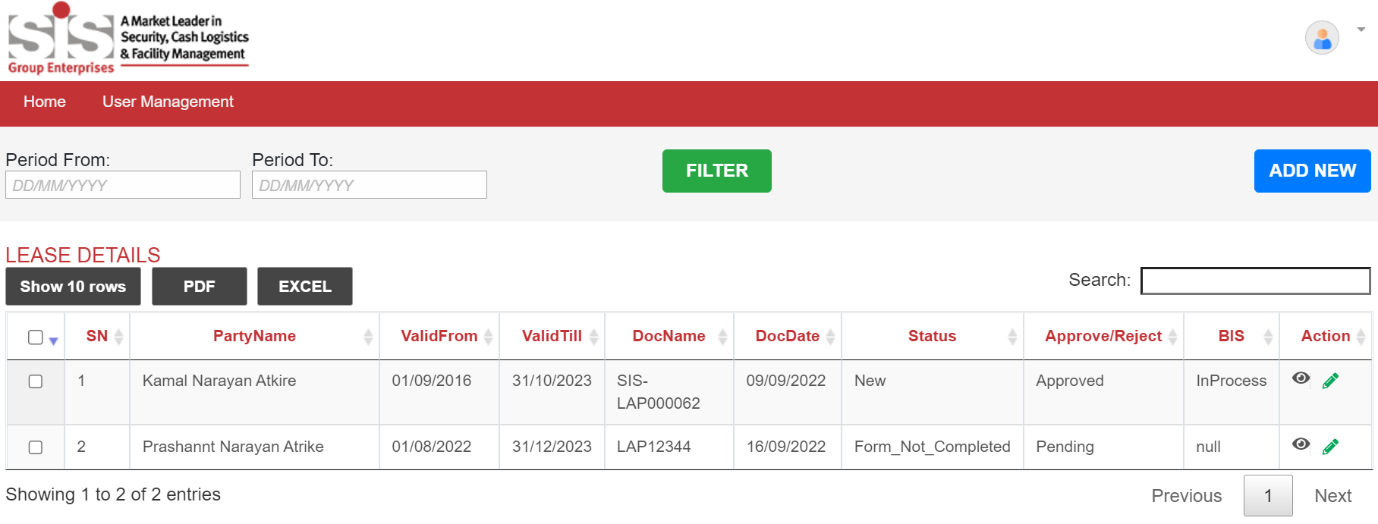
Lease records can be viewed by users from the dashboard. The dashboard allows users to see important information such as the party name, validity date, document date, document number, and the status of approval.
Lease Renewal
Users can make use of the system to renew an existing lease. Upon the renewal of the lease, a new agreement ID is created for the renewed lease. With the help of Power Automate, existing lease data gets copied to the new record.
Lease Extension
Users can extend the lease end date by utilizing the system. The extension can be done for a period of 12 months. However, the renewed lease is approved by the Super User.
Lease Termination
Users may close a lease period by choosing a closure date. The closure approval request is sent to the Super User. Once approved, the lease status will be officially updated as closed.
Integration with Fusion
Once all details pertaining to a lease have been verified, the user is able to run the Ad Hoc Process which allows the user to generate reports and vouchers that will be sent to Fusion for further processing.
How the Solution Works
The Lease Premises Management System can be accessed via SharePoint. Users can access the Lease Premises Flow and enter the necessary lease details.
Lease Details and Documents
Users can enter the required lease details. Besides, they can upload the fully signed lease agreement along with other lease records.
Lease Submission
Users can review the lease details before submitting. Then, the system forwards the lease premise for approval.
Approval and Review
After submission, the Super User receives an email notification. The Super User can review and approve or reject the lease.
Lease Lifecycle
After getting approval, users may take actions to either renew, extend or close their lease. Moreover, all these actions must go through several steps to obtain the necessary approval.
Fusion Data Transfer
Once the lease information has been verified, the users execute the Ad Hoc Process. Then the system generates Reports and vouchers and sends data to Fusion.
Core Modules Implemented
The system comprises major modules that support the management of leased premises and rental contracts. These modules manage various kinds of lease information in a structured manner. It includes details about the agreement, rent, beneficiaries, premises, and accounting input. This makes it easier for users to access and maintain the necessary lease information.
Lease Agreement Management
The system captures the important contract information, which includes contract number, lease dates, duration, and lock-in period.
Rent Management
It includes the rent components such as rent amount, electricity charge, maintenance charges, and other charges.
Beneficiary Management
The system captures important information on such topics as beneficiary, bank, GSTIN, and payment information. It also supports multiple beneficiaries.
Premise and Site Allocation
The system records information on a premise and also allows for site allocation.
Lease Accounting Inputs
The system saves inputs required for Indian Accounting Standards such as right to terminate, leasehold improvements, and asset retirement obligations.
Search and Dashboard Features
The users can search lease details. And, also view some important details such as Party Name, tenure, document details, and the status of the lease from the dashboard.
Final Result
SharePoint based Lease Premise Management System has helped an organization to process lease premises and rental agreements in a simplified way. It provides valuable lease information in a structured system. The organization can keep lease information in a more consistent manner. It also provides better control over lease information and related financial data.
Reduced Duplicate Entries
The system checks the existing records before capturing a new lease premise. This helps to avoid duplicate entries.
Improved Data Consistency
Vendor details are integrated with the Oracle Fusion vendor master. Thus, it helps to maintain accurate vendor details in lease records.
Structured Lease Information
The system saves important lease information in an organized and structured manner. This makes it easy to handle and retrieve the data whenever necessary.
Better Document Availability
Lease agreements can be stored along with the relevant lease records. Thus, users can easily access the relevant documents when needed.
Improved Data Transfer
The Verified Lease Details can be sent to Oracle Fusion via Ad Hoc Process. Reports and vouchers will be prepared as part of this process.
Managed Process of Lease
The system has different stages of the lease agreement, that is, New, Renewed, Extended, and Closed. This gives a clear overview of the current lease stage.
Improved Document Access
Lease agreements can be saved by referring them to the proper lease record. This way the document becomes available along with all pertinent lease information.
Tools & Technologies Used
Oracle Fusion

Power Automate
SharePoint
Industry
- Cash Logistics Services
- Facility Management
- Security
Copyright © 2026 Enaviya Information Technologies Pvt. Ltd. All rights reserved
