
Non-PO Expense Management Software for Manufacturers
Client Overview
Our client is a reputable and leading manufacturer of industrial steam turbines. It offers turbine solutions for industrial and renewable power applications. It has five decades of expertise in the steam turbine industry. Its products serve customers across many industries and countries. The company has built its presence through its expertise in turbine technology and its focus on meeting diverse industrial power needs.
Client Requirements
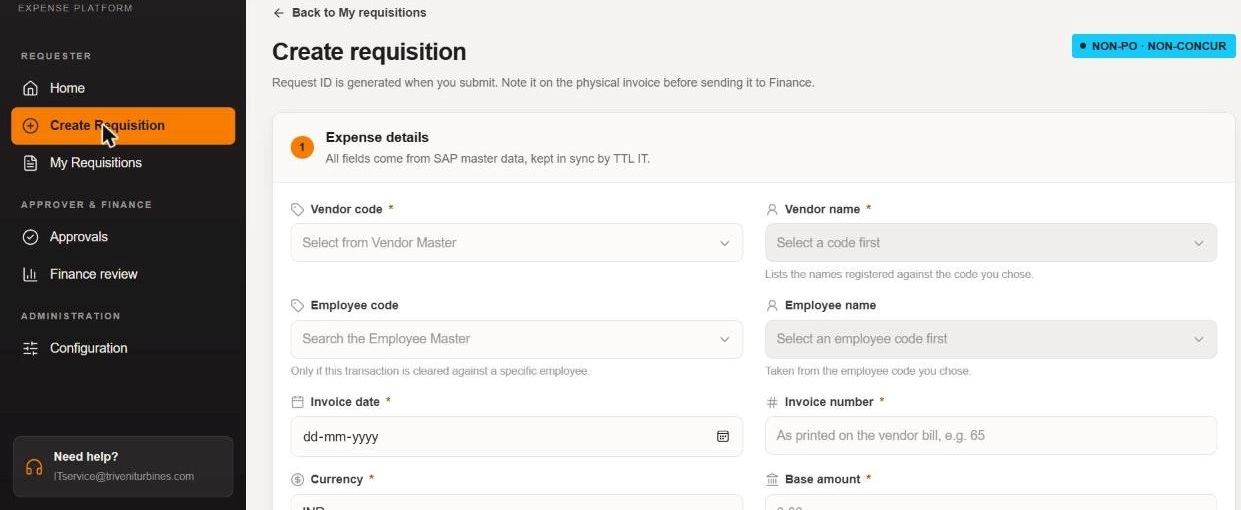
Our client needed a Non-PO Expense Management Software for Steam Turbine Manufacturers to simplify invoice processing and approvals. The previous process was based on email and paper documents. Thus, the organization required one centralized system for managing expense requests and approvals. Employees required an easy way to submit invoices and track their status. Approvers needed clarity on pending requests that needed approval. Finance team was in need of tools for reviewing invoices and creating SAP posting files. As a result, the organization collaborated with Enaviya to create a custom Non-PO Expense Management Portal.
- Develop a centralized Non-PO Expense Management Portal using SharePoint Online.
- Employees must be able to generate expense requests and save them in draft form.
- Capture the various categories of vendor, employee, invoicing, and accounting information.
- Employees will be able to upload scanned invoices and other supporting documents.
- Develop a two-tier reimbursement request approval process.
- Enable employees to choose their level 1 and level 2 approver.
- Enable approvers to review, approve, or disapprove the requests with comments or specific reasons.
- Track request status and view approval history.
- Allow the finance team to review invoices and assign the correct tax treatment based on the SAP system.
- Provide choices to the finance team for correcting the request data without changing the original request ID.
- Generate weekly Excel files to facilitate the SAP BDC posting procedure.
- Allow the Finance team to upload SAP posting data into the system and save document numbers for requests.
- Notifications about important steps in the approval process will be sent via email.
- Enable administrators to manage the suppliers, employees, GL codes, and other master data.
- Offer role-based access for users who submit requests, approve, finance reviewers, and admins.
Project Summary
Our client required a more efficient method of processing Non-PO and Non-Concur expense invoices. Previously, it depended on emails and hard copies. There was no easy way to manage the necessary requests and approvals. Also, managing the invoice details was quite difficult.
As a solution, Enaviya developed a custom expense and invoice management solution for industrial manufacturing companies by utilizing Microsoft SharePoint Online and SharePoint Framework (SPFx). With this portal, expense requests, approvals, financial reviews, and posting preparation with SAP will be centralized in one place.
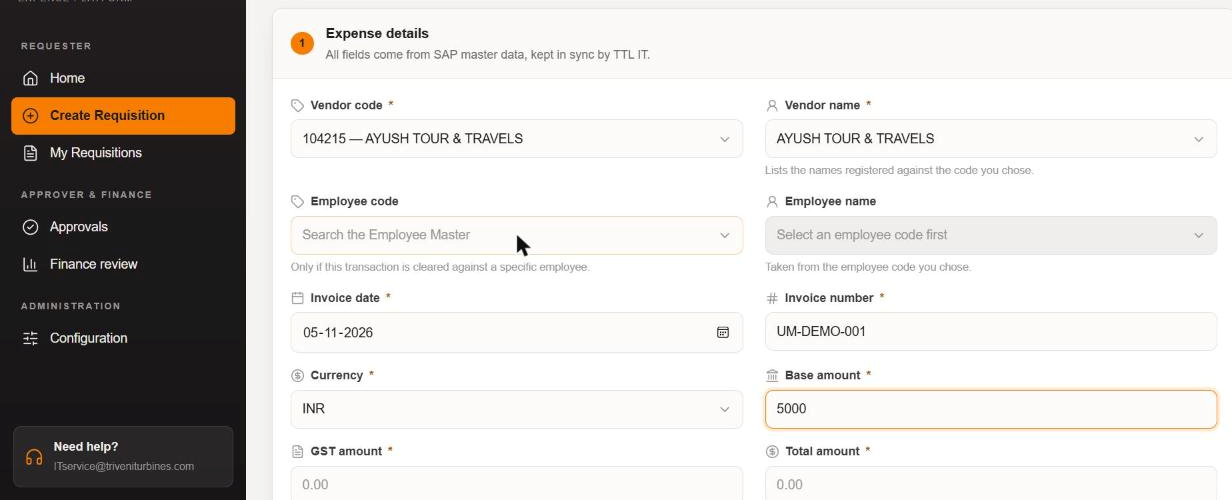
Employees can create expense requests and upload their invoices. Managers are responsible for either approving or rejecting requests. The Finance department can check the invoices, make decisions regarding tax treatment, and prepare necessary SAP BDC files.
In addition, the portal allows tracking requests as well as provides email notifications and approval history. After SAP posting, the Finance team is able to upload the SAP output file. The portal keeps a record of the SAP document number for each request. Furthermore, the system allows both employees and the Finance team to track every request from its submission to its final posting.
Our Global Offices
India
#563-564 Niran Arcade, 3rd Floor, New BEL Road, Bengaluru, Karnataka 560094
+91-98452 05968 info@enaviya.comUSA
8682 SPRING GARDEN DR,
# 8205 KELLER,
TX 76244
South Africa
Suite J, 4th Floor,
165 West street, Sandton,
Johannesburg,
South Africa - 2031
Follow Our Social network
Challenges
The client faced difficulties in monitoring expense invoices in its operations. The existing process involved using emails and paperwork. Tracking requests and approvals was done manually. Thus, the organization required better Non-PO Invoice Processing Software for Industrial Manufacturers.
Scattered Vendor Invoice Records
Earlier, the team was managing vendor invoices via emails and paper documents. It took additional time to find out invoice details. Also, supporting documentation was difficult to access.Manual Approval Procedure
The company needed to establish a clear invoice approval workflow for industrial manufacturing. Each request needed to be approved on two levels. It was hard to keep track of pending requests via email.Limited Request Tracking
Employees required better expense request monitoring. They struggled to find out the status of their requests. Finding out the pending approvals is also quite time-consuming.Complex Finance Review
The finance team had to ensure the accuracy of invoices related to industrial expenditures. It was also responsible for determining appropriate tax treatment. Correcting request details without changing the Request ID was important.Manual SAP Posting Preparation
Each week, the Finance department creates SAP BDC posting files. It also posts SAP output files after posting. There was a need to record document numbers.Difficulty in Managing Master Data
The company recorded vendor information and employee records. It also maintained accounting data such as GL codes. It has been very important to control and manage these records. Also, managing access for different user roles was also important.Solution Implemented
Enaviya developed a custom Non-PO Expense Portal for Turbine Manufacturing Company utilizing Microsoft SharePoint Online along with SharePoint Framework (SPFx). The portal acts as a combined platform to handle requests related to Non-PO expenses along with Non-Concur expenses. It simplifies invoice submission, approval, finance reviews, as well as SAP posting preparation.
Centralized Expense Management
The portal allows merging of expense requests together with the invoice details in one location. The employees can create requests and save them in draft. They can also upload scanned invoices and supporting documents.
Two-Level Approval Workflow
The portal follows the right order of approval. The employees can choose whom to use as Level 1 and Level 2 approvers. The approvers can review, reject, or approve the given requests. The approvers can also leave comments or the reasons for rejection.
Request Tracking and Approval History
Employees have the option to track their requests. They can also see their approval history. It is easier to know which requests are pending or fulfilled.
Finance Review and Tax Classification
Finance department can review the invoices received. It would be able to apply the relevant tax treatment. The department can also correct details without changing the original request ID. It would mark the physical receipt.
SAP BDC File Generation
The portal generates Excel files on a weekly basis within the SAP BDC posting procedure. These files can be applied in making SAP postings by the Finance department. After making the postings, an output file of SAP can be loaded into the server by the users. The web portal uses each Request ID to find out its respective SAP document number.
Master Data Management and Role Management
Admins can manage vendor, employee, and account details along with the management of user access. The portal assigns separate permissions to the different users such as requesters, approvers, finance reviewers, and administrators.
How the Solution Works
SharePoint-based Non-PO Expense Tracking Software for Manufacturing Companies follows a simple process for handling expense requests. It covers submission, approvals, Finance review, and SAP posting.
Submit Expense Requests
Employees enter invoice data when assigning their Level 1 and Level 2 approvers. They can upload the scanned invoices and save the requests in draft.
Approval Request
There are two levels of approval for request processing. The authorizer reviews any requests, which can be approved or rejected. Further, they can add comments or explain the reasons for rejection.
Finance Review
In the finance department, they check invoices and approve tax treatment. They have the option of not changing the Request ID but making changes as permitted. Physical invoices can also be marked as received.
Prepare SAP Posting Files
The Non-PO Expense portal generates Excel files for the current SAP BDC process. Finance team utilizes these portals for SAP Posting.
Update Request Status
After SAP posting, finance team will upload the SAP output file. The portal will record the SAP document number and change the status to Posted to SAP. Employees and the Finance team can then track the progress of the request.
Core Modules Implemented
Non-PO Expense Management Software includes various modules for managing financial records and supporting documents. Vendor details, information relating to invoices, and accounting information are organized in these modules. These make it possible for users to manage records easily using Invoice Management Software for Turbine Manufacturing industry.
Expense Request Management
This module stores records of the submitted expenses. It stores request details and unique request IDs. It also supports draft records.
Invoice Document Management
This module stores information on invoices, together with the supporting documents. It also supports documents in PDF, JPG, and PNG formats.
Managing the History of Approvals
The module keeps track of approval history. The records contain information about the approvers, remarks, conclusion, and reasons for rejection.
Finance Review and Tax Management
The module contains the details of the financial review. It supports RCM, Nil, and Forwarding Charges taxes.
Management of Paper Invoice Receipts
This module keeps the record of all receipts pertaining to paper invoices. Additionally, it allows the finance department to update each request status.
SAP BDC and Posting Records
The module records the necessary SAP BDC information. It connects Request IDs with its SAP document number.
Master Data Management
The module keeps information about suppliers or vendors, employees, and accounting. It also contains information about GL codes, cost centres, and other master data.
Dashboard for Reporting and Searching
The module allows searching for requests and checking their statuses. Users can also view their approval history. The finance department can export requests to Excel.
Final Result
SharePoint based Non-PO Expense Management Software integrates expense requests, approvals, and finance-related tasks into one centralized location. This portal is specifically designed for the machinery manufacturing industry. It improves the visibility of requests and makes invoice processing easier. Employees are able to monitor the status of requests, whereas the finance department utilizes the portal for scanning invoices and compiling financial records for posting in SAP.
Unique Request Identification
Every request is associated with a unique Request ID that connects the portal record, the SAP posting document, and the invoice.
Structured Approval Process
Each request has two levels of approval and is assigned to specific approvers. A mandatory rejection reason is required for rejected requests.
Complete Audit Trail
The portal maintains an entire trail of audit. It records who performed each action and when it was performed. Also, users can view the history on each request.
Improved Data Accuracy
All dropdown lists work with master data, which is kept centrally. The portal checks the required fields, accounting information, and invoice amount before an action takes place.
Simplified SAP Posting
During review, Finance team assigns the tax treatment. The portal generates a weekly SAP BDC file. After posting, Finance team uploads the SAP output file. The portal logs the SAP document number against every request.
Easier Administration
Administrators are able to add, edit, or delete master data. They can even bulk-import records from Excel. This makes data management easier.
Tools & Technologies Used

PnPJS

Power Automate

React

SharePoint Framework (SPFx)

SharePoint Online

TypeScript
Industry
- Manufacturing
Copyright © 2026 Enaviya Information Technologies Pvt. Ltd. All rights reserved