
Document Management System (DMS) which was built on SharePoint Online
Client Overview
Our client is one of the top health service providers in India. It operates a large network of hospitals across India. The organization serves patients at numerous locations. It extensively uses technology to carry out all clinical as well as business operations. It is also focused on quality, compliance, and smooth functioning of operations.
The organization required a more efficient way to handle the IT standards and operating manuals. Its previous SharePoint setup was hosted on-premises. It only allowed users to download files. Therefore, they partnered with Enaviya to create a Document Management System (DMS) which was built on SharePoint Online. The new solution has the capabilities of storing documents, role based access, tagging, searching, previewing, and controlled downloads.
Client Requirements
The customer required a more efficient method of managing IT standards and operating documents. The aim was to replace the SharePoint folder with a structured document management system. Users needed a simple way to search and view documents. In addition, admin users needed control over files, folders, tags, and permissions. The system also required role-based access, search, metadata, document preview, and controlled downloads.
- Create a centralized document management solution using SharePoint Online
- Include DMS as the new segment in the existing employee portal
- Create separate sections for IT standards and IT operating documents
- Give Admin users the ability to upload documents and create folders
- Give Delegated Admin users the ability to manage the files, folders, and tags in the specific area
- Add category, department, version, owner, and status information to the documents
- Allow users to add free-text tags for documents and folders
- Provide the search by file name, metadata, tag, or content characteristics
- Provide filters based on date range, document type, department, or owner.
- Allow users to preview documents in the browser.
- Provide users the option to download the document based on their permissions.
- Implement role-based access control for the users.
- Provide support for file permissions using IRM
- Utilize Active Directory for user and role mapping
- Allow users to view a document’s key information, including related documents
- Create a landing page that allows users to view document counts, status details, quick links, and key contacts.
Project Summary
Our client required a better way to manage its IT-related documents. Their previous SharePoint folder allows only to download files. The system does not permit document preview, advanced search functions, tagging, or detailed access controls. The clients also needed a simple way to access the documents they needed.
In order to address this need, Enaviya developed a digital document management system using SharePoint Online. The DMS will be integrated into the employee portal. The system will have dedicated sections for IT standards and IT operations documents. Users can search, filter, view details, and preview documents in the browser.
The users will have role-based access to the system. Admins will have the ability to upload files and create folders. Delegated admin users will have complete authority over documents in their respective areas. Other users can view documents based on their access permissions. Active Directory will be used to manage the roles of users. File-level permissions will control access to specific documents.
Automate Your SharePoint Document Management
Improve control, reduce manual provisioning, and manage documents more efficiently with Enaviya. Get Started Today
Our Global Offices
India
#563-564 Niran Arcade, 3rd Floor, New BEL Road, Bengaluru, Karnataka 560094
+91-98452 05968 info@enaviya.comUSA
8682 SPRING GARDEN DR,
# 8205 KELLER,
TX 76244
South Africa
Suite J, 4th Floor,
165 West street, Sandton,
Johannesburg,
South Africa - 2031
Follow Our Social network
Challenges
Prior to the implementation of the DMS, the company faced several challenges in managing their IT documents. SharePoint folder mainly supported file downloads. But it did not provide document viewing, searching for specific files, tagging, or controlling access to specific files. Users also found it very hard to find the right documents. It was important for the client to have a centralized and structured way to manage documents.
Limited Document Preview
Users were required to download documents in order to view them. They needed an option to preview supporting documents directly in the browser.Limit Search
The previous system did not provide the required search features. Users needed better options for finding documents using their file name, tags, metadata, and any other relevant details about documents.No Document Tagging
The previous system did not support the necessary document tagging. The client required tagging to help organize documents and locate them.Limited Access Control
The previous setup did not provide the necessary access according to roles. Thus, different users required different levels of access to the documents.Difficult in organizing documents
The system was unable to properly organize IT documents. It was quite difficult to manage information like, category, department, version, owner, and status.File level Permissions
The previous platform provided insufficient control over the documents. It was difficult to assign individual access rights for documents to specific users.Solution Implemented
Enaviya created a Digital Document Management System using SharePoint Online. The DMS platform was added to the existing employee portal as a new portion. Thus, users are able to obtain IT documents all in one place. They can browse folders, search for documents, view details of documents and preview supported files. This software also manages user access and document permission.
Central Document Management
The DMS offers a centralized location for the management of IT-related documents. Users can access documents via the employee portal. The system offers defined arrangements for various types of documents.
Document Upload and Folder Management
Admin users are able to upload files and create folders. The delegated admin users are also able to manage files and folders in their designated areas. They are also able to manage document tags and information.
Document Metadata and Tagging
This software has a feature that enables users to include information such as document category, department, version, owner, and the current status of the document. In addition, Users will be able to add tags as free text tags to their documents and folders.
Search and Filters
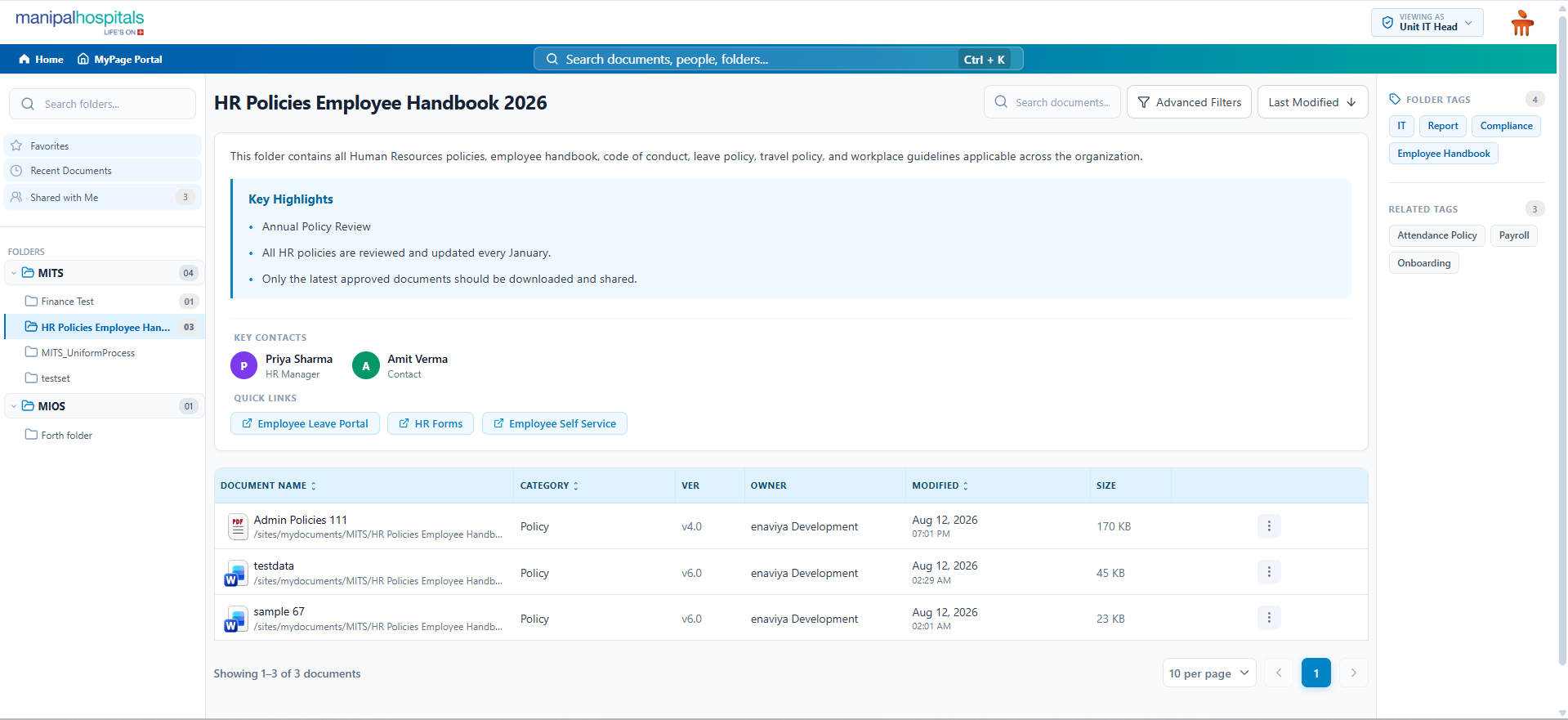
Users can search for documents by using file names, metadata, and tags. Moreover, they will be able to filter by the date when the document was created, the document type, and the name of the department.
Document Preview
Users can preview supported documents directly in the web browser. They can check out the file before downloading it. This makes document access much easier.
Document Details
Users have access to detailed information about documents. It includes important details, related documents, and file tags. This helps users to understand the documents before utilizing it.
Access Based on User Roles
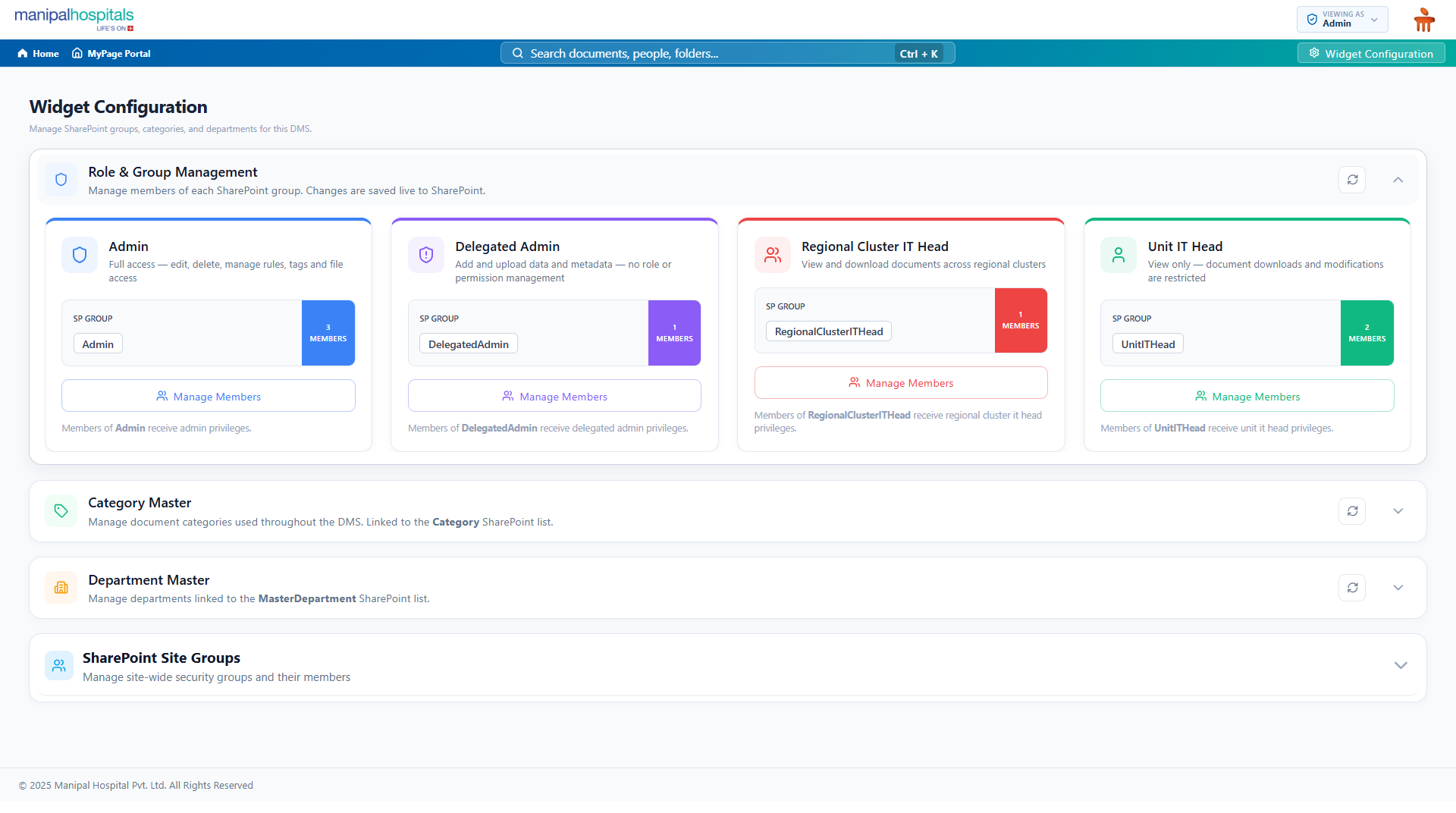
The system offers access to the documents based on user roles. Admin users will have full control. Delegated admin users manage the documents assigned to them. Other users have access depending on their roles.
File level access
The system provides control over permissions for each file. The admin user is able to grant permission to the selected users to download documents. Thus, access to the documents is controlled and maintained securely.
Landing Page
DMS comprises a landing page that displays the number of documents, their status, important contacts, and quick links. It provides an overview of the user's document repository.
How the Solution Works
The DMS is accessible through the existing employee portal. Users can open the DMS via the portal without a separate login. The system determines the user's role and grants access based on the assigned permissions. Once permitted, users can search, view, browse, or download the required documents.
User Access
Users can access the DMS through the employee’s existing portal. That means no separate login is necessary. Once the user logs in, the system automatically identifies the user’s role and allows the user to access the relevant information.
Browse and Search
Users can browse folders or search for particular documents. They can use file names, tags, metadata, and filters to find the relevant documents.
View and Preview
The user can select a file and examine its information. In addition, they can view related documents and preview supported documents in the browser.
Uploading and Managing
In addition, Admin and Delegated Admin users can upload files and create folders. Additionally, they can also tag and modify the details in the document if needed.
Access and Download
The system verifies the user's permission before granting access or downloading. The admin user can grant rights to chosen users for specific documents.
Core Modules Implemented
Enaviya has created various modules in DMS that will help users and admins. Each module focuses on a particular aspect of the document management process. The modules include document management, user management, metadata, searching, and granting permissions. All these modules combine together and provide a structured way to manage documents via one system.
Document Repository
This particular module handles the document libraries. It offers the storage structure for the two document sections.
Administration
This module provides all necessary controls for the DMS administration. The module is responsible for the website configuration settings, document areas, and administrative functions.
User Roles
This feature manages different types of user roles within a system. The module is created for the access model of Admin, Delegated Admin, Regional IT Head, and Unit IT Head user types.
Active Directory Integration
This module integrates DMS with Active Directory through which users can be identified and associated with their unique roles within the system.
Security and Permissions
This module is in charge of managing access to folders and individual files. In addition, this supports IRM for documents that need high protection.
Metadata Configuration
This feature manages the key information associated with each document. It supports details such as category, version, owner, department, and status. It also supports free-text tags.
Search Configuration
This module supports the search function of DMS. Users can search relevant documents based on their names, tags and text.
Portal Integration
This connects the DMS with the existing employee portal. Employees can access the document management system directly without any additional login procedure.
Final Result
With the implementation of the Document Management System, the client is able to manage IT documents in an organized manner. It allows users to access, search, view, and preview documents from a single platform. DMS also supports role-based access, file permissions, and document management. This makes accessing documents more convenient and organized.
Centralized Document Management System
All IT-related documents are maintained in one place. Therefore, users can easily find and access the necessary documents.
Faster Documents Search
Users can search for documents according to their name, tags, metadata, and text. This helps users to find the relevant documents quickly.
Better Document Access
Users can preview documents directly in a web browser. Users also have the ability to download documents based on their permissions.
Improved Document Control
This will allow Admins and Delegated Admins to manage documents, folders, tags, and other details related to documents.
Controlled User Access
Access is determined by user roles and file permissions. This guarantees that users can use only permitted documents.
Better Document Visibility
The landing page displays the number of documents, status information, key contacts, and quick links. This allows users to view the repository of documents.
Tools & Technologies Used

Azure Active Directory

Microsoft 365

PnPJS

Power BI

React
SharePoint Framework (SPFx)
SharePoint Insights
SharePoint Online
Single Sign-On (SSO)

Tailwind CSS

TypeScript
Industry
- HealthCare
Copyright © 2026 Enaviya Information Technologies Pvt. Ltd. All rights reserved
