
CAPEX/OPEX Approval System - Case Study
Client Overview
Our client is a global leader in industrial steam turbine solutions. The company provides steam turbine solutions to various industries across the globe. Additionally, it also provides refurbishment services that extend the life span of existing steam turbines. These services allow industries to enhance turbine performance and decrease operating costs. The company serves customers across more than 80 countries and 20 industries.
The organization wanted to find a more effective solution for the management of the requests for Capex and Opex. Various departments were engaged in this process and had to follow many steps of approval. The users required an easier way to generate and control their requests. The approvers required a better understanding of the status of requests. As a result, the organization partnered with Enaviya to develop a Capex/Opex Approval System based on SharePoint.
Client Requirements
Our client required an efficient way for managing Capex and Opex requests. The project's goal is to establish a clear process of initiating, reviewing, and approving expenditure requests. The users need an easy way to make a request as well as follow up on its progress. The approval team also requires clear visibility into pending requests, approval phases, and turnaround time.
- Create a centralized system for Capex and Opex requests by using SharePoint.
- Allow users to create the requests for Capex and Opex using the system.
- The system displays the required fields depending on the type of request.
- Allow users to submit their request details in the appropriate fields.
- Route the request to the right approvers.
- Set approval rules in accordance with budget, department, and amount.
- Enable approvers to approve, reject, or send back requests.
- Allow users to view the status of their requests.
- Maintain the records for requests.
- Provide dashboards for requests and expenses tracking.
- Prepare reports for monitoring the delays in approvals.
- Provide an opportunity for feedback submission.
- Offer mobile access through SharePoint.
Project Summary
Our client needed an improved way to manage Opex and Capex requisitions. The procedure involves multiple stages of approval. These stages will vary by request type, department and budget. Thus, the users wanted a simple way to create the requests and track the status. In addition, approvers also required clear view into their pending approvals and requests.
To address this need, we developed a Capex/Opex Approval System on SharePoint. The system allows users to create requests for Capex or Opex. The necessary data fields will be displayed in the form according to the type of request chosen. The request will go on passing through the necessary approvals based on predefined rules.
The system supports different approval workflows for Capex and Opex requests. It allows approvers to approve, reject or ask for more information. Users can even view the request and can check the status of it. Other features provided by the system include dashboards, TAT reports, feedback, and mobile access.
Simplify Your CAPEX & OPEX Approval Process
Automate approval workflows, improve visibility, and reduce manual processes with a centralized CAPEX/OPEX management system.
Our Global Offices
India
#563-564 Niran Arcade, 3rd Floor, New BEL Road, Bengaluru, Karnataka 560094
+91-98452 05968 info@enaviya.comUSA
8682 SPRING GARDEN DR,
# 8205 KELLER,
TX 76244
South Africa
Suite J, 4th Floor,
165 West street, Sandton,
Johannesburg,
South Africa - 2031
Follow Our Social network
Challenges
Before implementing the Capex/Opex system, our client had faced several challenges with managing expenditure request. The approval process was complicated, because it has involved multiple level of phases. This made it very difficult to manage the request across departments. Users were unable to track the status of their requests. Tracking the pending applications was also difficult.
Complex Approval Rules
Different requests could follow different approval rules. Therefore, approval processes are more complex to manage.Limited Visibility of Pending Requests
Users and managers do not have extensive visibility on pending requests. This makes it hard to have a clear idea of pending requests that need to be processed.Difficulty in Tracking Approvals
There can be many approval steps involved in the request process. Thus it was difficult to determine the present approval stage and the next person who is responsible to take action.Delays in Approvals
Certain approval stages can take much longer than others. It also makes it challenging to determine at which point delays happen.Limited Activity Tracking
Keeping track of all steps taken in a requisition was a challenge. The organization required accurate records of approvals, comments, users, and timestamps.Difficult in managing Turnaround Time
The organization was looking for a better way to monitor approval time information. It was a struggle to detect delays and compare turnaround time of different processes across departments and roles.Solution Implemented
In response to these challenges, Enaviya developed a Capex/Opex Approval System via SharePoint. The system integrates request creation, approval, tracking, reporting, and feedback in one centralized location. It introduces a systematic procedure for managing expenditure requests. The system also enhances the possibility for users and approvers to gain better insights regarding request status and approval activity.
Requisition Creation
Users can create Capex or Opex request in the system. The form displays the necessary fields based on the chosen request type. This makes it easier for users to fill in the details for each request.
Approval Workflow
At every stage, the request approval is handled by the system depending on the request type, budget, and department. In this way, each request flows through the appropriate approval stages.
Approval Actions
Approvers have the ability to review requests at every stage of the approval process. They are permitted to either approve, reject, or ask for more information. Consequently, the request then flow to the next stage based on the action taken.
Request Management
A user is able to see all the requests including pending requests, approval requests, and rejected requests. User can also see all the request details related to the requests submitted and can also work on the changes once the requests are returned for modification.
Audit Trail
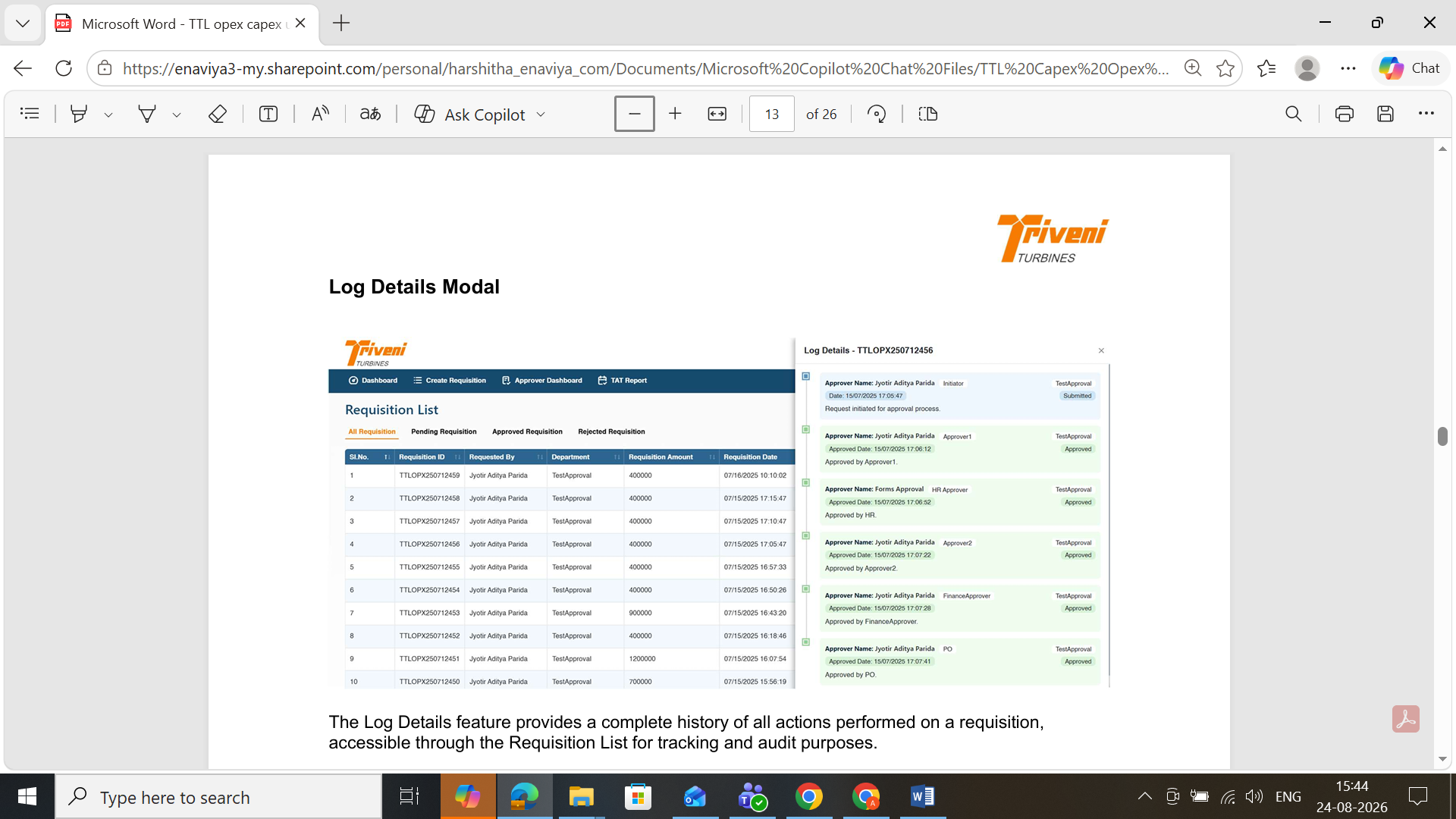
The system maintains detailed records of all actions taken on requests. It provides information regarding the user involved, what action was taken, how much time it took, remarks, and the status of the request. This provides complete information about every stage of the request process.
Dashboard
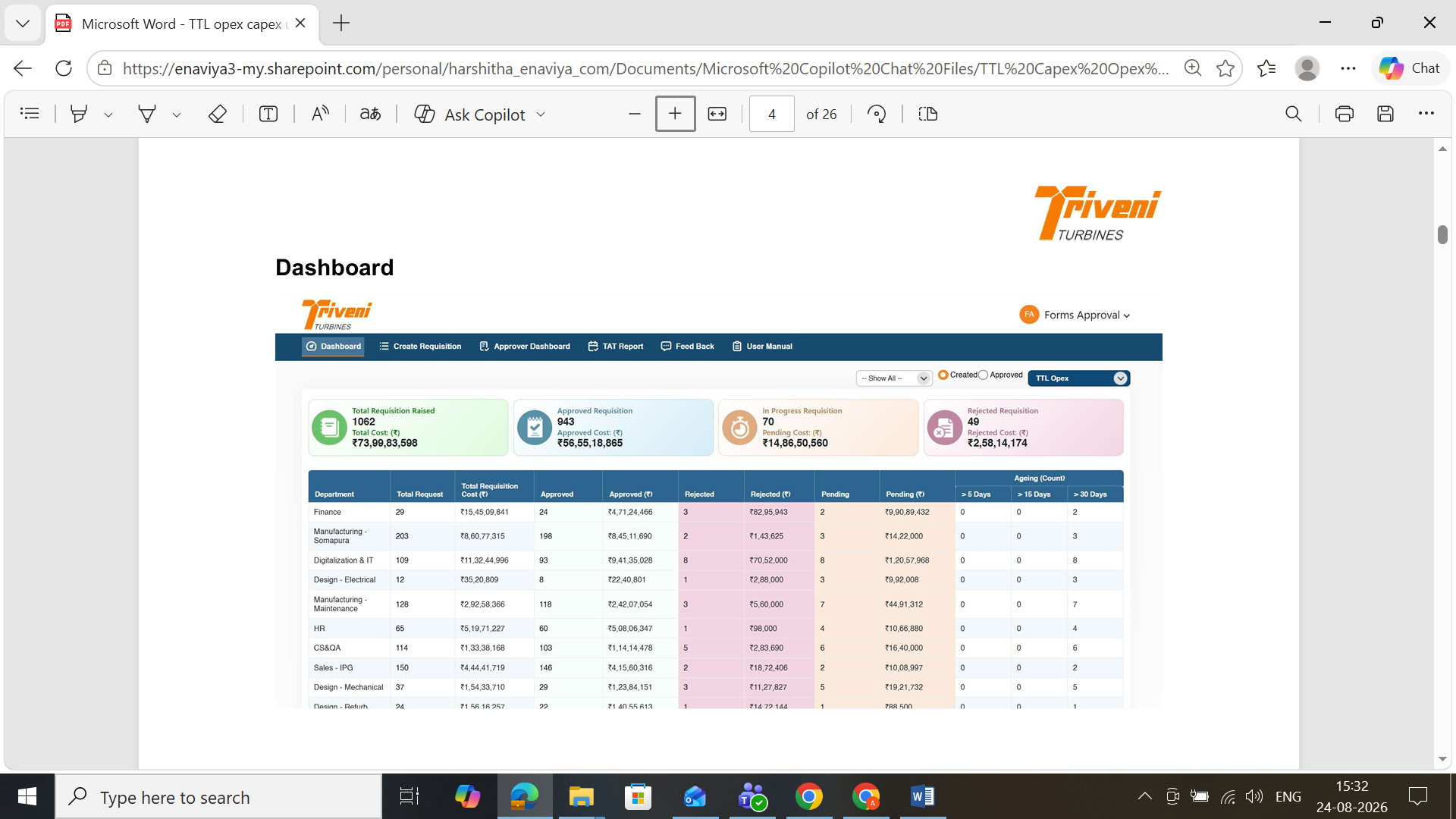
The dashboard displays various information such as number of requests, cost, department data, and ageing details. It provides clear visibility for the users regarding current request status.
TAT Reports
The TAT report shows the duration between various approval stages. The reports helps the organization to easily track the request approval time. And, it helps to identify delays and areas that might need to look into.
Feedback
The users can share their feedback via system. In addition, they can manage and view their submitted feedback. This makes it easier to keep track of every feedback.
Mobile Access
Users can access the system via the Microsoft SharePoint Mobile App. Thus, approvers can review the request and take actions from mobile devices.
How the Solution Works
The users will have to access the Capex/Opex systems by going through the SharePoint portal. Users can create and submit the request based on the assigned access. After the submission of request, the system will move the requests through all the necessary stages of approval. It is also possible for the users to monitor their requests and their approval status.
User Access
Users have the ability to log into the SharePoint site using their work account. The access granted depends on the role they have been assigned.
Create a Request
Users select either the Capex or Opex option and fill out the necessary information. The request form displays the fields based on the type of request chosen. There will be separate forms for Capex and Opex.
Approval Process
The system verifies the request data and takes it through the necessary approval phases. The approval stages can change depending on the type of request, budget, and department.
Review and Action
Approvers are able to check the request and its specifications. They may approve it, reject it, or ask for further information.
Request Tracking
The users have the ability to check the status of their requests. They can check the requests which are pending, approved or rejected. They can also check the history of request.
Core Modules Implemented
The system consists of different modules in order to support the Capex and Opex approval process. Each of the modules deals with specific functions of the system. The modules assist in managing data about requests, rules of approval, user access, records, reports, and feedback. These modules also assist in maintaining the key details needed throughout the process.
Requisition Module
This module is responsible for the handling of data and information regarding Capex and Opex requests. It stores the information related to the request.
Workflow Configuration
This module is responsible for managing approval rules and workflow settings. It supports different approval procedures depending on business needs.
Role and Access Management
The Role and Access Management module keeps track of users' roles within the system. It controls which users are able to access the system.
Audit and History
This module keeps records of everything done in regard to requisitions. It records actions, users, remarks and timestamps for reference purpose.
Reporting and Analytics
This module contains all required dashboard and reporting capabilities regarding requisition data. Users can review information and analyze it.
Final Result
The Capex/Opex Approval System has improved the expenditure request process of organization. It enables users to view their requests and approvals more clearly. Users can monitor their requests more effectively. The approvers can check for request activities on all the stages. The organization can track the approval time and also identify the delays.
Improved Process Visibility
The organization has gained improved visibility into spending requests. Now, approvers and users can see the status of their requests more easily.
Better Approval Monitoring
It is now easier to monitor the approval process at different stages. This allows the teams to keep track of requests that require action.
Improved Request Control
The organization can handle both capital expenditure (Capex) and operating expenses (Opex) order requests in a constant way. This helps to reduce confusion on how requests are processed.
Clear Activity Records
Organization have a clear record of any actions that have been undertaken in relation to the requests. This makes it possible to review earlier activities regard to the request.
Better Delay Detection
Organization has the opportunity to review the approval time in different stages. This will enable to identify the delays and areas that might need action.
Improved Decision-Making
Data on requests and costs is available through dashboards and reports. This allows the team members to analyze spending and improve their decision-making process.
Tools & Technologies Used

.NET APIs

Bootstrap

CSS

HTML

JavaScript

Power Automate

SAP

SharePoint Framework (SPFx)

SharePoint Lists

SharePoint On-Premises
SharePoint REST APIs

SQL Server
Industry
- Manufacturing
Copyright © 2026 Enaviya Information Technologies Pvt. Ltd. All rights reserved
